Releases
Deployments are how code reaches production, and there can be many in a day. A release is how you tell people about it. It gathers every deployment of a Product that reached production since the last release under one version, tags exactly what runs, and gives you two write-ups to read and edit: release notes for engineers and a post for everyone else.
You don't have to keep count. A Product's Releases tab says when there is enough in production to be worth announcing, drafts both write-ups from the commits that shipped, and leaves the decision to you.
Releases and deployments
A deployment is one build of a Product moving through its environments: built, tagged with the next patch version, promoted zone by zone and watched by its release guard. A merged Change starts one on its own, and so does a person's push to the default branch.
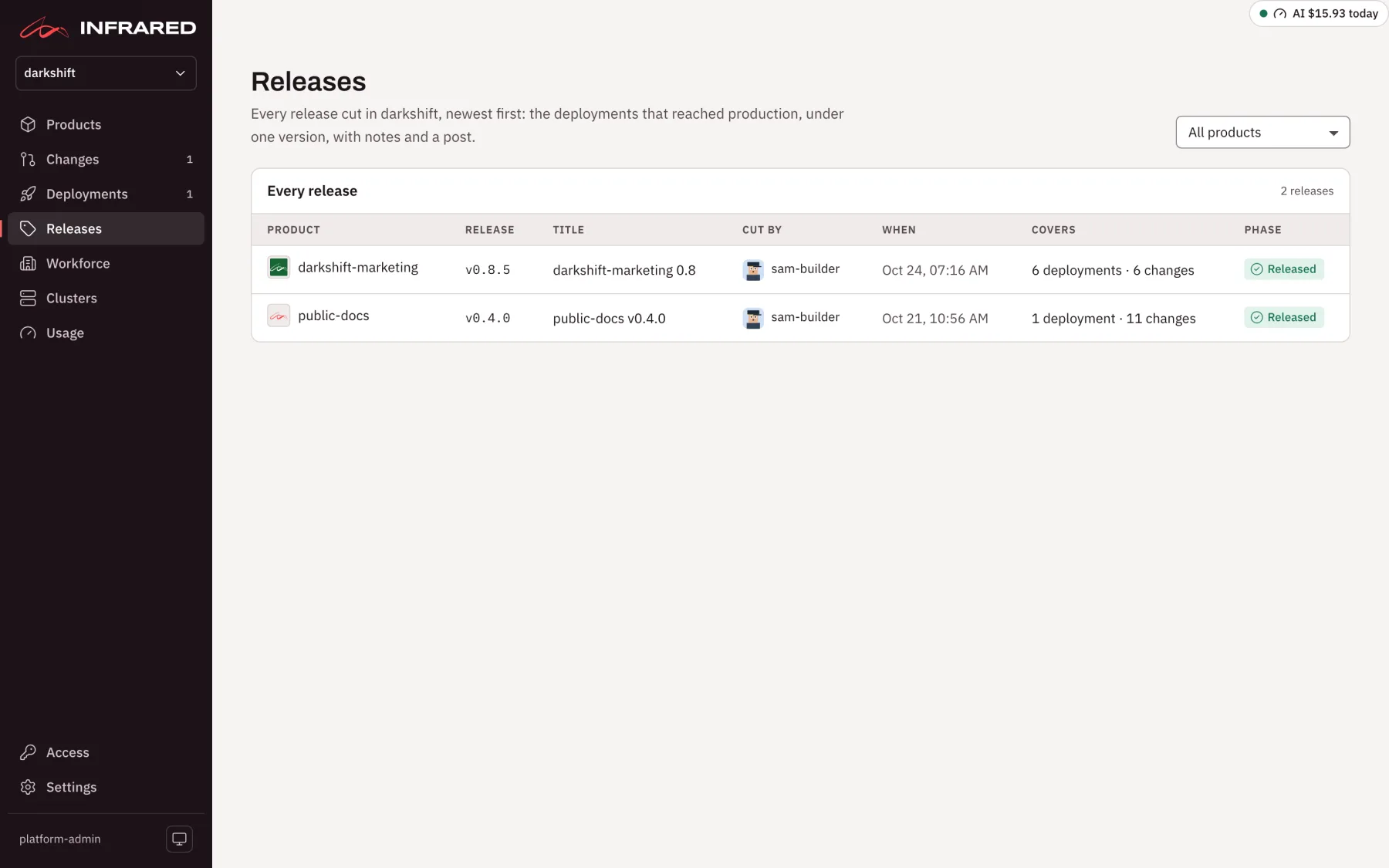
A release is what people read. In the API it is the ReleaseCut resource.
| Deployment | Release | |
|---|---|---|
| What it is | One build on its way through the zones | The deployments that reached production since the last release, under one version |
| Started by | A merged Change, a person's push to the default branch, or Start a deployment | An org admin who cuts it |
| Version | The next patch: v1.6.1, v1.6.2 | The version production runs (v1.6.4), or the next minor or major (v1.7.0, v2.0.0) |
| Tags | A git tag on the commit | A git tag on the commit, and the image digest tagged with the version |
| On GitHub | A GitHub release on its tag, marked latest once it runs in every zone | A GitHub release with the notes, marked latest |
| Phases | Pending, Building, Tagged, Promoting, AwaitingApproval, Released, Failed | Pending, Tagging, Publishing, Released, Failed |
Version numbers and tracks
Each deployment bumps only the patch, counting from the newer of the last deployment's version and the last release's. The first deployment of a Product with no tag at all is v0.1.0.
A release announces a track: a major.minor such as 1.6. "The 1.6 release" means every patch that reached production under 1.6, from v1.6.0 to whichever runs now. When you announce 1.6, the release takes the version production runs, such as v1.6.4. That version's deployment already made its tag and its GitHub release, so the release makes no new tag: it writes its title and notes onto that GitHub release and marks it latest. The next deployment then opens the next track, v1.7.0.
You can also cut a new minor or major instead, a version of its own such as v1.7.0 or v2.0.0, tagged on the commit running in production. The draft suggests a major when a deployment since the last release holds a breaking change and the Product is at 1.0 or later. The choice is always yours.
The nudge
When there is enough in production to tell, the Releases tab says so above the tracks: how many changes reached production since the last release, by kind. Enough means at least one feature, one breaking change, or ten fixes.
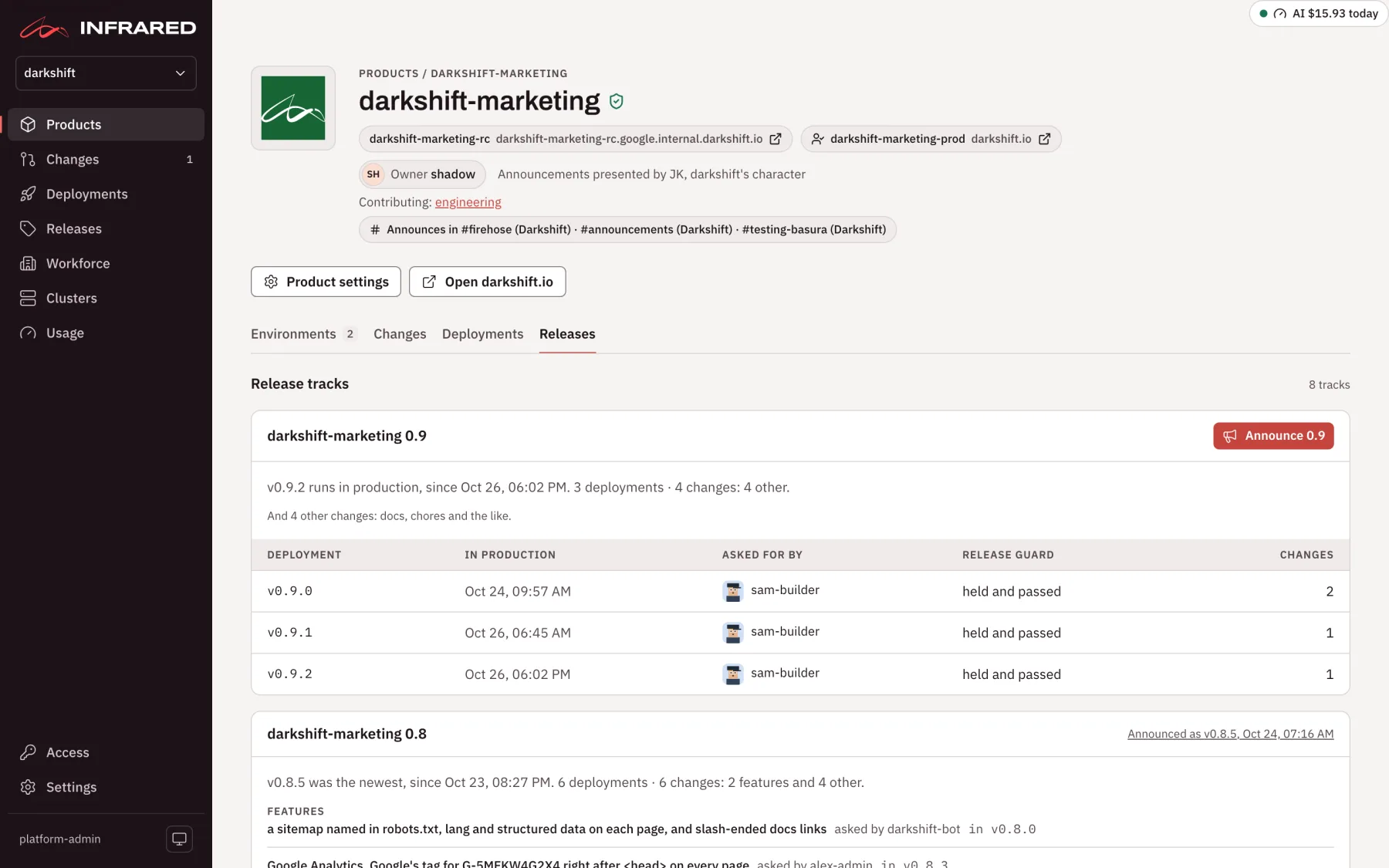
Infrared reads the kind from each commit's conventional commit subject: feat is a feature, fix is a fix, and a ! or a BREAKING CHANGE footer marks a breaking change. Anything else counts as other. The nudge is only a suggestion. You can release a single fix, or let twenty features wait.
Announce a release
Only an org admin or a platform admin can cut a release. Everyone else in the org sees the tab, the drafts and every release.
-
Open the Product and its Releases tab. Release tracks lists each track, newest first: the version in production (or the newest one), since when, its changes by kind, and the deployments that shipped them, each with who asked for it and how its release guard ended. An announced track links to its release.
-
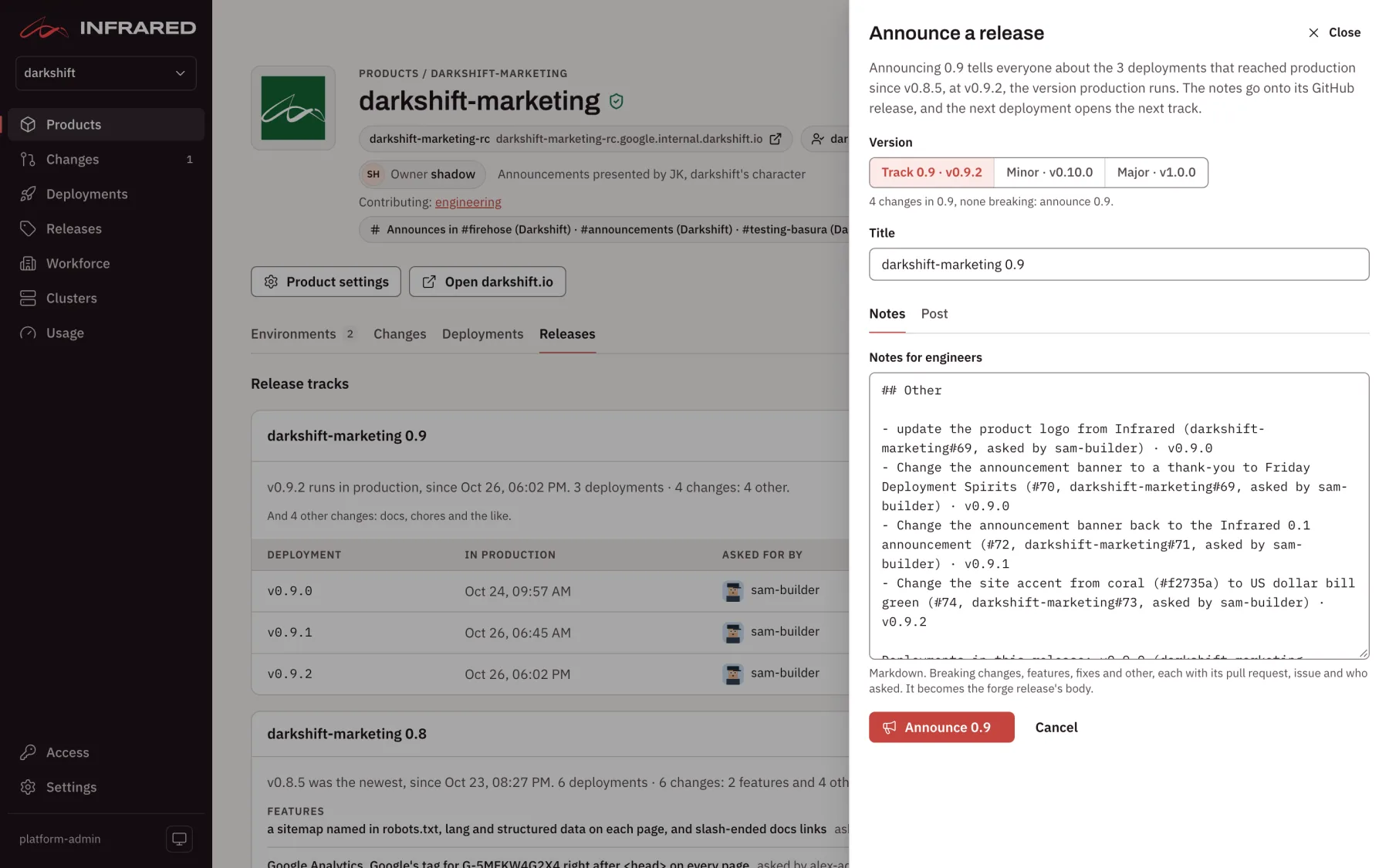
Choose Announce 1.6 at the top of the tab. The Announce a release drawer opens and says what the release will cover.
-
Under Version, keep Track 1.6 · v1.6.4 to announce the track at the version in production, or choose Minor or Major for a version of its own. The line underneath says why the draft suggests what it does.
-
Check the Title. It defaults to
<product> <version>. -
Read the Notes and the Post, and edit either as you like.
- The notes are for engineers, in Markdown: Breaking changes, Features, Fixes and Other, each section only when it has items. Each item names its pull request, its issue, who asked for it and the deployment that shipped it. The notes become the GitHub release's body.
- The post is for everyone else: a few plain lines, a breaking change first, then each feature in a short paragraph, then the number of fixes.
Infrared drafts both from the commits; no agent writes them.
-
Choose Announce 1.6 (or Cut release v1.7.0 for a minor or major). The drawer closes and the release's page opens, showing each step as it happens: Tagging, Publishing, then Released, or the reason it failed.
Releases so far, at the bottom of the tab, lists the Product's releases, newest first: version, title, who cut it, when, and how many deployments and changes it covers.
Infrared refuses a release when nothing new reached production since the last one, and while another release of the same Product is still being cut.
What cutting does
Cutting zippy at v1.7.0, with the deployment zippy-7kq2m running in production:
- Tags the commit. The git tag lands on the commit the production deployment shipped. Nothing is built, so the release is exactly what runs.
- Tags the image. The image digest running in production gets the version as a tag in the Product's registry, beside the tag its deployment gave it.
- Publishes the GitHub release on the tag, with the notes as its body, marked latest.
- Sends
release.cutonce. Every enabled AgentWorkflow with arelease.cuttrigger starts one run for the release, such as the catalog's Release AgentWorkflow, which ships switched off. See Triggers and scheduling.
Announcing a track makes no new tags, because the deployment already tagged that version, and writes the title and notes onto its existing GitHub release. Each step happens once: a release that fails partway, for example because GitHub didn't answer, resumes from the step that failed and never repeats a tag it made.
A release covers the deployments that reached production after the last release, in the order they got there. With no release yet, it covers every deployment since the Product's last GitHub release, or all of them when there is none.
The release's page and its post
Every release in the org is listed under Releases in the rail, newest first, with its Product, version, title, who cut it, when, what it covers and its phase. Filter the list by Product at the top.
A release's own page, /releases/<product>/<version>, shows:
- who cut it and when, and how many deployments and changes it covers
- every change by kind, and the deployments in the release with who asked for each
- Facts: the tag, the commit, the image digest, the GitHub release, the bump, the deployment it tagged and the runs it started
- Notes as published, folded until you choose Show notes
Read the post opens the post on a page of its own, /releases/<product>/<version>/post, in a plain reading column without the engineering detail. Infrared doesn't publish the post anywhere else: share the page or copy the text wherever your people read.
If a release fails, its page says why. The tag and the GitHub release stay where they were made, and the deployments it covers stay in production.
Each deployment keeps its own page under Deployments. An old link to /releases/<deployment> opens that deployment.
With ir
ir release cut --product zippy --track
ir release cut --product zippy
ir release cut --product zippy --major --title "zippy v2.0.0" --notes-file notes.md --post-file post.md --yes
ir release list --product zippy
ir release get zippy-1-7-0
| Command | What it does |
|---|---|
ir release cut --product <p> | Cuts a release at the next minor. Add --track to announce the track in production at its version, or --major for the next major. It shows the draft and asks before cutting, unless you pass --yes |
--title, --notes-file, --post-file | Replace the draft's title, notes or post. A file of - reads standard input |
ir release list [--product <p>] | The org's releases, newest first, or one Product's |
ir release get <name> | One release: its tags, the GitHub release, its changes by kind and the deployments it covers. -o yaml adds the notes and the post |
ir release works with releases only. Deployments have their own commands, such as ir deployment new and ir deployment promote (see Deployments). Given a deployment's name, ir release get points you to ir deployment get.
With the API
| Operation | What it does |
|---|---|
GET /v1/orgs/{org}/products/{product}/releasecut-draft?bump=track|minor|major | The draft: what reached production since the last release, the versions to choose from, the nudge, and the drafted title, notes and post |
POST /v1/orgs/{org}/releasecuts | Cuts a release: product, bump (track, minor or major), and optionally title, notes and post; the draft's are used where you leave them empty. Answers 403 below org admin, 409 when nothing new reached production or another cut is under way, and 422 on an unknown bump |
GET /v1/orgs/{org}/products/{product}/release-tracks | The Product's tracks, newest first, each with its deployments, its changes by kind and the release that announced it |
GET /v1/orgs/{org}/releasecuts?product=<p> | The org's releases, newest first |
GET /v1/orgs/{org}/releasecuts/{name} | One release, with its notes, its post, every change by kind and the deployments it covers |
A release is named <product>-<major>-<minor>-<patch>, for example zippy-1-7-0.