Connect an MCP client
Infrared ships an MCP server, so the agent in your own terminal can read Infrared the way you do. Ask Claude Code which deployments failed this week, why a run stopped, or how a Product's SLOs look, and it answers from Infrared itself rather than from guesses.
Every tool only reads. Infrared serves the server at /mcp on its own address, over streamable HTTP, and passes each request to the infrared-mcp Deployment.
The access token
Every request to /mcp sends Authorization: Bearer <token>. Without it, or with the wrong one, the server answers 401. The chart makes the token once, in the Secret infrared-mcp-access, key token, in Infrared's namespace, and keeps it across upgrades. A platform admin with access to the cluster reads it:
kubectl --context <cluster> -n infrared get secret infrared-mcp-access -o jsonpath='{.data.token}' | base64 -d; echo
To choose the token yourself, pass --set mcp.access.token=<token> at install, or point mcp.access.existingSecret at a Secret you made with a token key.
This token only lets a client into the MCP server. The server then reads Infrared with a token of its own, in the Secret infrared-mcp-token, which you never hand out.
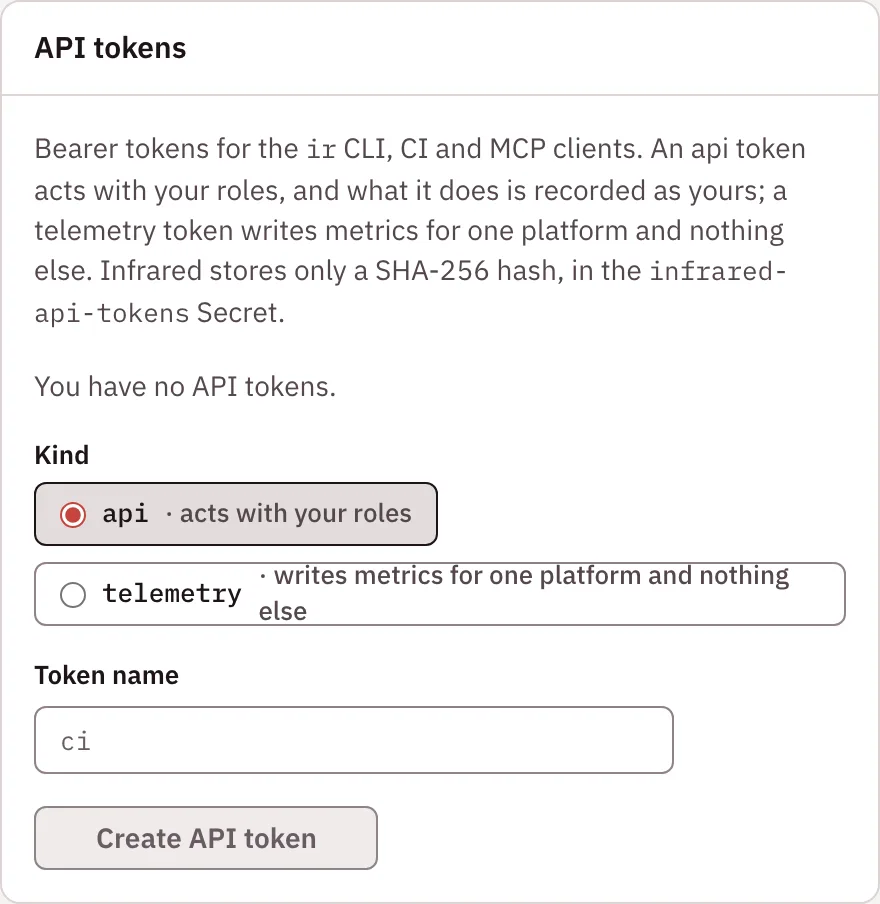
It is not an API token. ir, CI and other clients that call the API directly use an API token from the API tokens panel on your You page: give it a Token name and choose Create API token. Infrared shows the token once and keeps only its hash.
Claude Code
claude mcp add --transport http infrared https://<your Infrared host>/mcp \
  --header "Authorization: Bearer $(kubectl --context <cluster> -n infrared get secret infrared-mcp-access -o jsonpath='{.data.token}' | base64 -d)"
Through a port-forward, use http://localhost:8080/mcp instead.
Tools
Tools that take org default to the platform org. Results are JSON text.
| Tool | Arguments | What it returns |
|---|---|---|
infrared_status | The install's phase and version, the platform org, the management cluster, the gitops repo's phase and sync waves, and counts | |
list_clusters | The management cluster and the workload clusters | |
list_orgs | The orgs. The platform org has spec.platform: true | |
list_products | org | The org's Products |
get_product | org, name | One Product, with its repos and its current deployment |
list_agentroles | org, category, enabled | The org's AgentRoles, optionally only one category, such as architect or builder, and only enabled or disabled ones |
get_agentrole | org, name | One AgentRole, the catalog spec it came from, and whether the org changed it (differsFromCatalog) |
list_agentworkflows | org | The org's AgentWorkflows and their steps |
list_access_groups | org | The org's access groups: each one's role, its members by GitHub login, its Workspace group and the GitHub team kept in step |
list_teams | org | The org's Teams in Workforce: each one's charter, manager, people, AgentRoles and Products. A Team grants no access |
list_humans | org | The org's people in Workforce: each one's job role, manager and reports, and the access groups and Teams they are in |
get_license | The license's state (licensed, trial, grace or paused), when the open beta or the grace ends, and what the license grants. Never the license itself | |
list_runs | org, product | AgentWorkflowRuns, newest first, with each step's status |
get_run | org, name | One AgentWorkflowRun, with each step's verdict, evidence and token use |
list_releases | org, product | Deployments, newest first, with each zone's phase and pull request. The tool keeps the API's name |
list_incidents | org, product, open | Incidents, open ones first |
get_slos | org, product | The Product's SLOs in each zone: attainment, error budget, burn rates and state |
get_dora | org, product, days (1 to 365, default 30) | The Product's four DORA metrics and their ratings |
Only name, and product for get_slos and get_dora, are required. See SLOs, incidents and DORA for what the last three return.
Code tools
When the install runs its code index, eight more tools search and read code: your own repositories and the open-source ones your platform runs on, each at the commit the index's manifest names. Every result is cited as repo@commit:path:L<start>-L<end>, so an answer can say exactly where it comes from. Only the platform org reads the code index, and org defaults to it.
The public /mcp address doesn't serve them, so private code is never one shared token away. You reach them in one of two ways, both described in Code index: signed in through Infrared at /mcp/code, or through a port-forward to the MCP server's code listener. Agent steps reach them through their runner.
| Tool | Arguments | What it returns |
|---|---|---|
code_repos | org, query | The repositories you may read, with the refs the index holds and the commit each names. The other code tools read only these |
code_card | org, repo, ref | The repository's card, a page a person approved about it at one commit, and whether the ref has moved past that commit |
code_search | org, query, repos, max | Hits for a search, with the lines around each. Regular expressions, sym:, file:, lang: and branch: all work |
code_symbol | org, name, repos, max | Where a symbol is defined |
code_read | org, repo, ref, path, from, to | Lines of a file, at most 2,000 per call |
code_tree | org, repo, ref, path | A directory's entries |
code_log | org, repo, ref, path, n | The commits that touched a path, newest first |
code_diff | org, repo, from, to, path | The files changed between two refs, then the diff |
The same reads are API calls under /v1/orgs/{org}/code/.
Rotate the token
Replace the token key in the Secret infrared-mcp-access, then update your clients. The MCP server reads the token from its mounted Secret at every request, so it takes the new one, usually within a minute, with no restart.