Start from a zip
This is the quickest way from files to a running site. Create a Product with a new repo, upload a zip of what you have (a static site, a Node app or a Go service), and Infrared builds it, deploys it to a pre-production environment, and gives you an address that only people signed in to Infrared can open. You don't write a build, a chart or a gitops file.
Create it
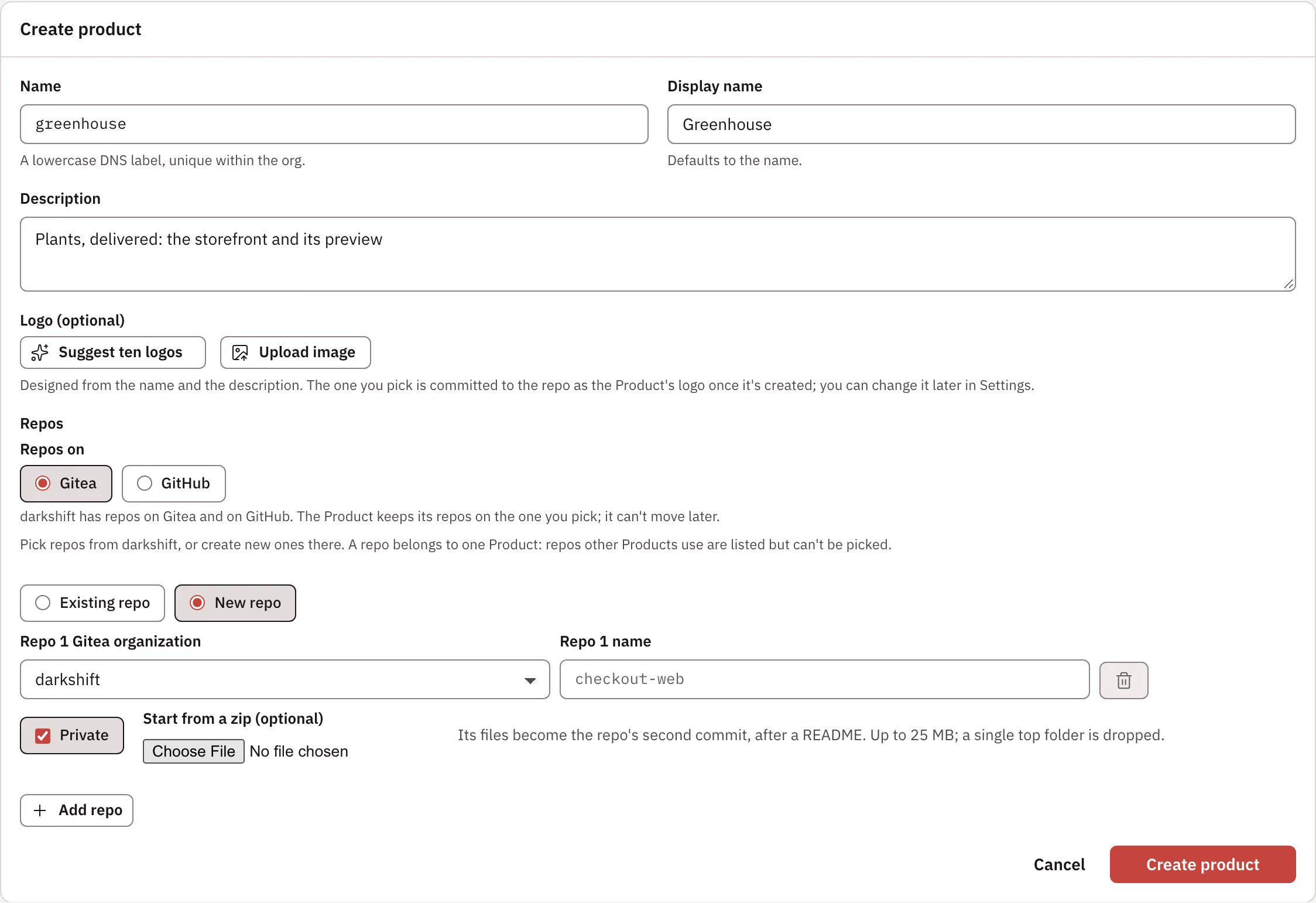
- On Products, choose Create product. Give it a Name (a lowercase DNS label, unique within the org) and, if you like, a Display name and Description.
- Under Repos, choose New repo, pick the organization and type the repo's name. Private is checked by default. When the organization has template repositories, Start from offers them beside An empty repo (a README).
- Under Start from a zip (optional), pick the zip. Its files become the repo's second commit, after a README. It can be up to 25 MB, and when everything sits in one top-level folder (as when you zip a folder), that folder is dropped. With a template, the field reads Add files from a zip (optional), and the zip's files go on top of the template's.
- Optionally, under Logo, choose Suggest ten logos. Claude designs ten from the name, the description and the zip (its main page's title and headings, and the colors in its HTML and CSS), each in its own direction. Pick one with Use this, or Upload image (SVG, PNG, JPEG or WebP, up to 512 KiB). It is committed to the repo as the Product's logo once the Product exists.
- Keep Build it and open a preview checked (it appears on the first repo once you pick a zip or a template), then choose Create product.
The Product's page then shows Getting <product> live, with four steps and where each one is: writing the build, chart and environment to the gitops repo; building the first image; deploying it; and live. Once the environment runs a version, the steps give way to its tile (Environments). Click its screenshot or address to open the site.
What Infrared does
| Step | What happens |
|---|---|
| Detect | From the zip: a go.mod makes it a Go service, a package.json a Node app, and otherwise the shallowest folder with an index.html is a static site. A zip with HTML pages but no index.html (such as a design export with one page per variant) gets an index.html linking each page, the main page first. |
| Image repository | On ECR, Infrared creates <registry>/<org>/<product> before the first build, with the standard lifecycle rules. |
| Build | It writes the Product's kpack Image to products/<product>/build/ in the gitops repo, with its Application. Static sites are served by nginx (the Paketo web-servers buildpack, BP_WEB_SERVER=nginx). |
| Chart | A generic web chart in products/<product>/chart/: a Kubernetes Deployment once a deployment pins an image, a Service, and the route to the environment's address behind Infrared sign-in. Edit it freely; it's yours. |
| Environment | <product>-rc, a pre-production zone with an address and a smoke check (GET / once it has been Healthy for 30 seconds). |
| AppProject | Adds <product>-* to the products AppProject's destinations. |
| Merge | All of the above in one pull request that Infrared merges. |
| Deployment | Once the files are in, Infrared starts the Product's first deployment: it waits for the build, tags v0.1.0, pins the image in the environment, and waits for Argo CD and the smoke check. |
When you're happy with it, add a production environment from the Product's page or its settings (Add an environment).
Nothing builds or deploys from a Product without spec.delivery.scaffold, so Products made from existing repos are unaffected until you set up delivery.
With the API, send "delivery": {"zones": [], "scaffold": {"kind": "static", "root": "public"}} when you create the Product (kind is static, node or go; root only for a static site in a subfolder). With no zones, Infrared adds the <product>-rc environment above. The form does this in three calls: POST /v1/orgs/{org}/repos creates the repo, POST /v1/orgs/{org}/repos/{repo}/starter commits the zip (as application/zip) and answers with what it detected, and POST /v1/orgs/{org}/products creates the Product. POST /v1/orgs/{org}/logo/suggestions suggests logos before the Product exists.
Addresses
An environment with an address is served on the installation's platform domain: https://<product>-rc.<platform domain> for the pre-production zone, and https://<product>.<platform domain> for a production zone named <product>-prod. Certificates come from Let's Encrypt.
By default an address is signed-in only: every request goes through Infrared first, and a visitor who isn't signed in is sent to Infrared's sign-in and back. Signing in gives the site its own cookie, valid for 12 hours and for that one host only, so your Infrared session never reaches the site. Only people with a role in the org that owns the Product (any role, viewer included) and platform admins can open it. Infrared checks the visitor's role again at most once a minute while the cookie lasts, so someone who loses their role, for example by leaving an access group, is sent to sign in again. An org admin can make an environment Public in its settings (Instance settings).
Pages are served with Cache-Control: no-store and without ETag or Last-Modified. Built files carry a fixed timestamp, so those headers would make browsers keep an old page after an edit that keeps a file's size.
Set up the platform domain
An installation's administrator does this once:
-
Point a wildcard DNS record,
*.<platform domain>(for example*.apps.example.com), at the management cluster's ingress. -
Tell Infrared the domain and its own public URL in the chart value
installation.previews, in the install's values for Infrared in its gitops repo:installation:previews:domain: apps.example.comsignInURL: https://infrared.example.comThe operator writes these to the Installation's
spec.previewswhen it starts, and never overwrites a value someone set there. Changing the domain later moves every environment's address: Infrared rewrites each zone's values through the gitops repo. -
Optionally, let orgs add domains of their own (see Domains and addresses). Add to
installation.previewsthe host and IP their CNAME and A records point at (ingressHost,ingressIP), and the roots Infrared may create subdomains under (managedRoots), with a Cloudflare token allowed to edit DNS in those zones (cloudflareTokenSecret, a Secret in Infrared's namespace whose keyapi-tokenholds the token). On a Gateway edge,customHostnames: trueserves orgs' own domains through Cloudflare for SaaS.
Without a platform domain, environments still deploy, with no address.
Not yet
- The form scaffolds only the Product's first new repo, and only when it starts from a zip or a template.
- Only ECR repositories are created for you; other registries must create repositories on push.