Licensing
An Infrared license is a signed token from darkshift. It says who the install is licensed to, on which plan, with which limits and until when.
The open beta
Infrared 0.1 is an open beta. It is free to use, needs no license, and has no limits through November 30, 2026, in UTC. There is no billing during the open beta.
The open beta ends at 00:00 UTC on December 1, 2026, the same moment for every install. It doesn't depend on when you installed Infrared, and restoring the install onto a new cluster doesn't change it.
After the open beta, an install with no valid license pauses new agent work and promotions to Production until you install one. Nothing that already runs stops. Later releases of Infrared need a license bought from darkshift to run the way 0.1 runs during the open beta. To ask about one, book a call or write to [email protected].
While the open beta lasts, a banner across the top of every page tells you how many days are left, such as Open beta: 12 days left. In its last 7 days it turns into a warning, so the end never comes as a surprise.
License states
Infrared works out the state from the installed license and the date. You see the same state everywhere: on Settings → License, in the banner, in GET /v1/license and in ir license get.
| State | When | What works |
|---|---|---|
Open beta (trial) | No valid license is installed, and the open beta hasn't ended | Everything, with no limits |
Licensed (licensed) | A valid license is installed and hasn't expired | Everything, within the license's limits |
Grace (grace) | The installed license has expired, until 7 days after it expired or the end of the open beta, whichever is later | Everything, within the license's limits. The banner counts down to the pause |
Paused (paused) | The open beta ended with no valid license, or the grace ended | Everything except new agent steps and promotions to Production. The banner says what waits and how to fix it |
A license that is malformed, or whose signature doesn't verify, counts as no license: the install is in the open beta until it ends, and paused after that. Settings → License says why the license isn't valid.
What a pause holds back
While the install is paused, two things wait:
- New agent steps. When an AgentWorkflowRun reaches an agent step, the step stays
Queued, and the run says a license is needed (itsProgressingcondition has reasonLicenseRequired). A step already running finishes. Nothing fails: the run carries on by itself within a minute of a valid license being installed. - Promotions to Production. A deployment waiting to promote into a Production zone stays where it is, with its approval if it has one, and says a license is needed. It promotes once a valid license is installed.
Everything else keeps working: your running workloads, Argo CD's syncs, reading everything in the UI and the API, human approvals and other human steps, CI and merge steps, promotions to Pre-production, backups and restores, upgrading Infrared, and installing a license.
Limits
A license may limit the number of orgs (orgs) and workload clusters (clusters). A limit of 0, or none at all, means no limit. During the open beta there are no limits. An expired license's limits still apply during its grace and while paused.
| Limit | What counts |
|---|---|
orgs | Every org, the platform org included |
clusters | Every workload cluster. The management cluster doesn't count |
Infrared refuses to create an org, or to register or build a workload cluster, beyond the limit. It answers with HTTP 403 and a message that names the limit and how to raise it. The orgs and clusters you already have keep working, even when a new license sets a lower limit. Settings → License shows how many of each you use against the limit, and so does usage in GET /v1/license.
What a license contains
A license is one line that starts with irl1.: base64url JSON claims, followed by darkshift's Ed25519 signature over them. Infrared checks the signature with a public key built into Infrared, so checking works offline.
| Claim | Meaning |
|---|---|
id | The license's ID, for support |
customer | Who it is for |
plan | The plan, such as team or enterprise |
orgs, clusters | The limits on orgs and workload clusters. Absent means no limit |
iat, exp | When it was issued and when it expires. No exp means it never expires |
Install a license
You can install a license at any time, in any state. Installing one is never paused. An expired license is accepted too, so you can install a renewal early or late.
In Settings
The License panel on Settings shows the State with a sentence on what it means, when the open beta or the grace ends, and the Orgs and Workload clusters you use. For an installed license it adds Licensed to, Plan, Expires and License ID. Everyone signed in can see it.
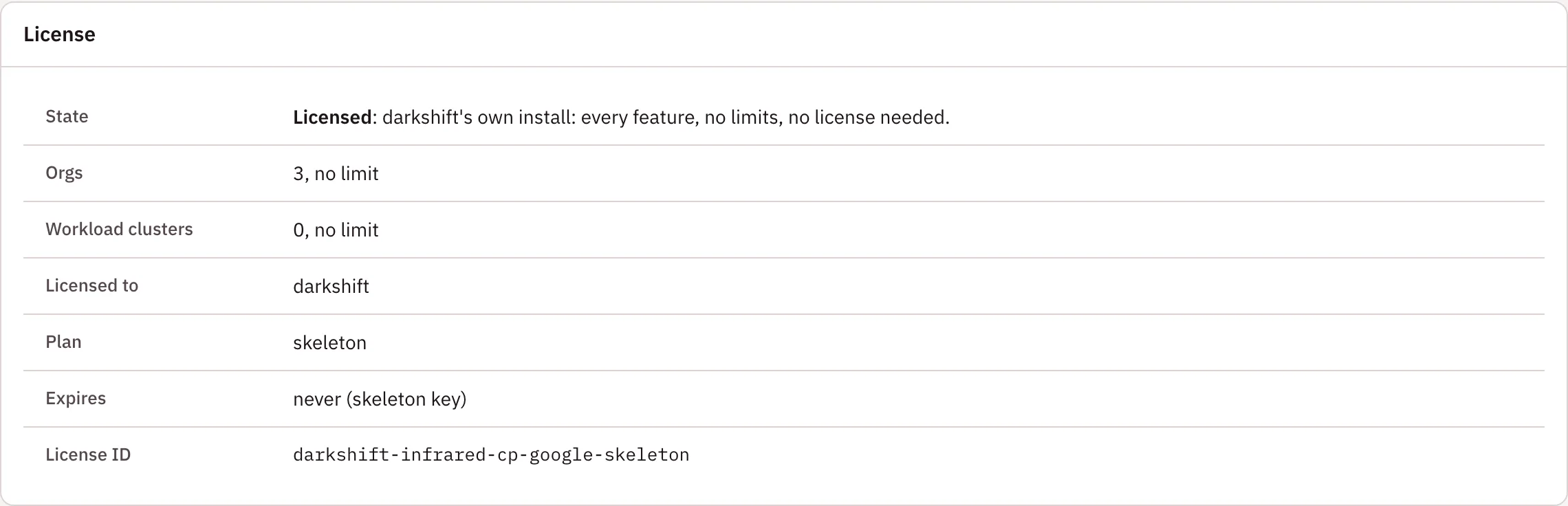
To install one, sign in as a platform admin with Google or as the root user. Paste the license, which starts with irl1., into Install a license and choose Install license. The panel shows the new state straight away. People signed in with GitHub don't see the field.
With ir
ir license install installs a license into a running Infrared as the root user:
ir license install infrared.license --email <root user's address>
ir asks for the root password from your break-glass vault, signs in for that one call and signs out again. Infrared records it as a use of the root user (Break glass).
To install the license with the install itself, pass it to ir install, which writes the Secret infrared-license through the cluster's own context:
ir install --context <cluster> -f infrared.yaml --license infrared.license
Through the API
PUT /v1/license with {"license": "irl1...."}, from a platform admin's session opened with Google or the root password. API tokens and GitHub sessions can't install a license. Infrared verifies the license first and refuses one that is malformed or whose signature doesn't verify, with HTTP 422.
With kubectl or the chart
Infrared keeps the license in the Secret infrared-license, key license, in its namespace, infrared by convention. You can create that Secret yourself with access to the cluster, which also works on an install that has turned password sign-in off:
kubectl --context <cluster> -n infrared create secret generic infrared-license --from-file=license=infrared.license
Or give it to the chart, in one of two ways:
| Value | What it does |
|---|---|
license.key | The license itself. Pass it with --set-file license.key=infrared.license so it never sits in a values file. The chart writes the Secret infrared-license and keeps it when the values stop carrying it, so a license you install later in Settings stays. A later upgrade that passes it again replaces what Settings installed |
license.existingSecret | The name of a Secret you keep yourself in Infrared's namespace, with key license, such as one External Secrets copies from your secret store. Infrared reads the license from it. To install a new license, update that Secret at its source |
With a gitops repo, use license.existingSecret, so the license never lands in git.
Read the state
GET /v1/license, which anyone signed in and any API token can call, returns the state, what the license grants and your usage against its limits. It never returns the license itself. ir license get shows the same.
{"state": "licensed", "installed": "valid", "paused": false,
 "id": "acme-20261001", "customer": "acme", "plan": "team", "orgs": 3, "clusters": 5,
 "expiresAt": "2027-10-01T00:00:00Z", "message": "Licensed to acme (team).",
 "usage": {"orgs": {"used": 2, "limit": 3}, "clusters": {"used": 1, "limit": 5}}}
| Field | Meaning |
|---|---|
state | licensed, trial, grace or paused |
installed | What the Secret holds: none, valid, expired or invalid |
paused, pausedReason | Whether new agent steps and promotions to Production wait, and why, in one sentence |
trialEndsAt | When the open beta ends, 2026-12-01T00:00:00Z. Set while no valid license is installed |
graceEndsAt | When the grace ends: the later of 7 days after the license expired and the end of the open beta. Set while the installed license has expired |
usage | The orgs and workload clusters in use, each with its limit. A limit of 0 means none |
Renew or replace a license
Install the new license the same way; it replaces the old one. Deleting the Secret infrared-license removes the license, and the install goes back to the open beta until it ends, then pauses.