Deployments
A deployment is one version of a Product on its way through its environments: built, tagged, then promoted environment by environment, with a release guard watching each one. Infrared does the moving. You see where every version is, you approve what goes to production, and if an environment goes wrong after a deployment, its release guard rolls it back without waiting for you to notice.
The API calls a deployment a Release, so its paths and fields keep that name (/v1/orgs/{org}/releases). A Release in the UI is something else: a release cut, the versions that reached production gathered under one number.
Where deployments come from
You rarely start one yourself:
- A merged Change. After the merge, the Change's Promote to pre-production step deploys the merge commit, and Promote to production waits for your approval to send the same version on. See Ask for a change.
- A push. Every push a person makes to the default branch of one of the Product's repos deploys that commit. The deployment waits two minutes before it starts, and pushes in that time join it, so a push and the quick fix after it ship as one. It starts after any deployment of the Product already under way. Pushes by a bot (such as Infrared's own merges and version commits), a push that merges a pull request a Change is working on, and pushes to other branches start nothing.
- By hand. Start a deployment on Deployments, or on a Product's Deployments tab, opens a form: pick the Product, optionally type a Version, and choose Start deployment. Infrared deploys the head of the default branch. Leave Version empty for the next patch (or the next pre-release on a pre-release track); only a release takes the next minor or major.
With ir, ir deployment new --product <product>, adding --version or --commit to choose them. With the API, POST /v1/orgs/<org>/releases with {"product": "<product>"}.
The Deployments page
Deployments, in the navigation, lists every version on its way through its environments, newest first. The number beside it counts the deployments still on their way.
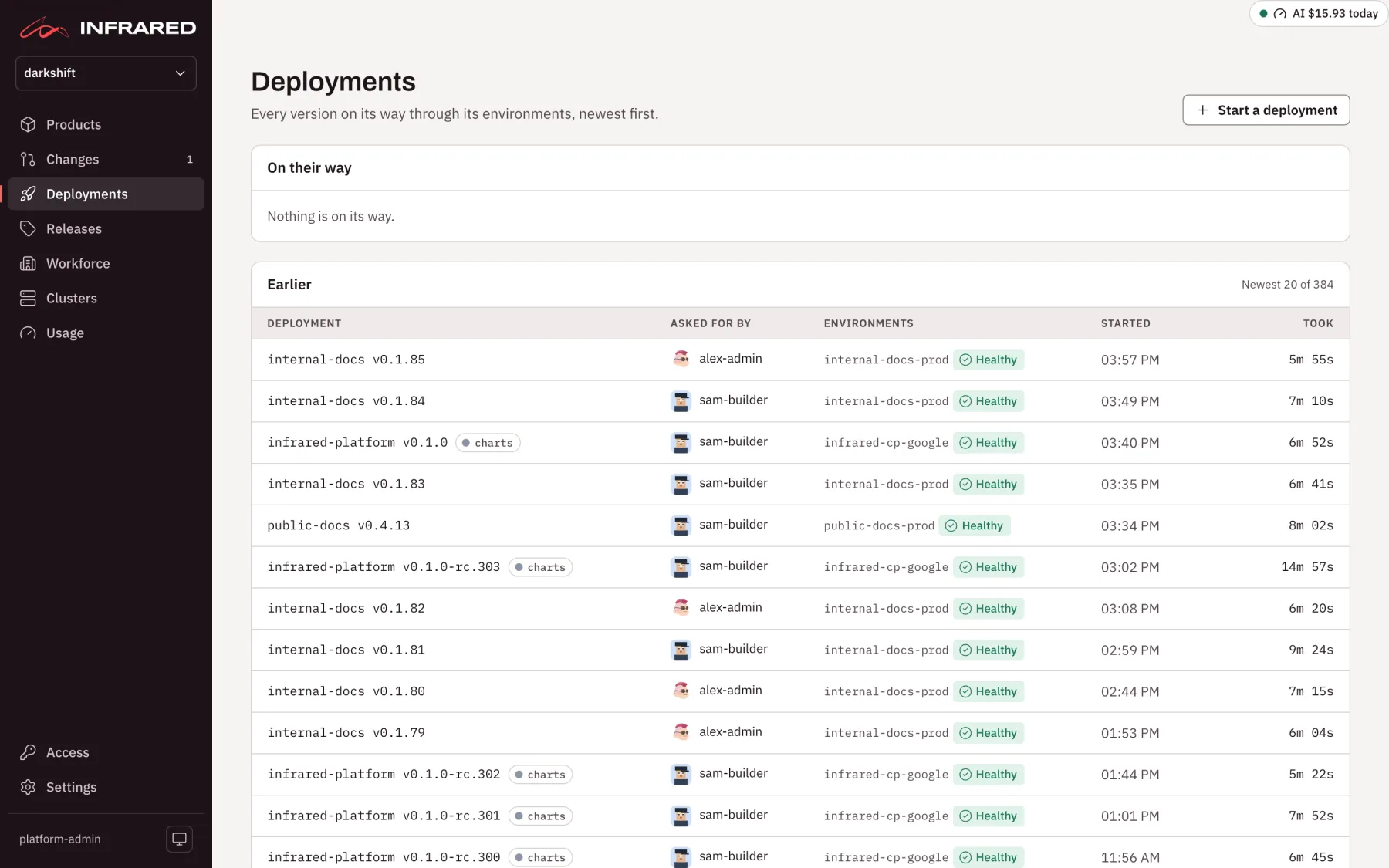
The page has two panels:
- On their way: every deployment that hasn't finished.
- Earlier: the rest, 20 at a time, with Show more.
Each row shows:
| Column | What it shows |
|---|---|
| Deployment | The Product and version, which opens the deployment's page. No hold marks one whose environments all deploy Fast; a Product with several repos marks the repo it came from |
| Asked for by | The person who asked for it, or Infrared's mark when Infrared started its Change on its own |
| Environments | Each environment with its state. One waiting for you shows Approve <zone>, which opens the deployment's page at the approval |
| Started | The time of day, or the date for an older one |
| Took | How long it took, or how long so far |
Before its environments are known, a row shows the deployment's state instead: Pending, Building, Tagged, Promoting, Guard holding, Deployed, or Failed: retry, which opens the page to retry it.
A Product's own deployments, with what each one shipped and its earlier versions, are on its Deployments tab. See Products.
What a deployment does
- Waits for the build. It finds the kpack build of its commit and waits for it to finish.
- Picks the version. Unless you set one, it's the next patch after the newest
vX.Y.Ztag. - Tags. It tags the image's digest and the commit
vX.Y.Z, records the commits it ships since the previous version, and makes a GitHub release on the tag. That release is marked latest only once the deployment runs Healthy in every environment, so a repo's latest release is what production runs. - Promotes each environment, in order. For each zone, it opens a pull request to the gitops repo that pins the new image, merges it, waits until Argo CD reports the zone Synced and Healthy, runs its smoke check, and lets the zone's release guard watch it. Then it moves to the next zone. A zone that takes deployments after approval waits for you.
Production runs exactly the image pre-production ran, by digest, so what you checked in pre-production is what ships. How to set up a Product's zones, checks and guard is in Deliver a single app.
A deployment's page
A deployment's page tells you where the version is, what waits for you, and what it shipped.
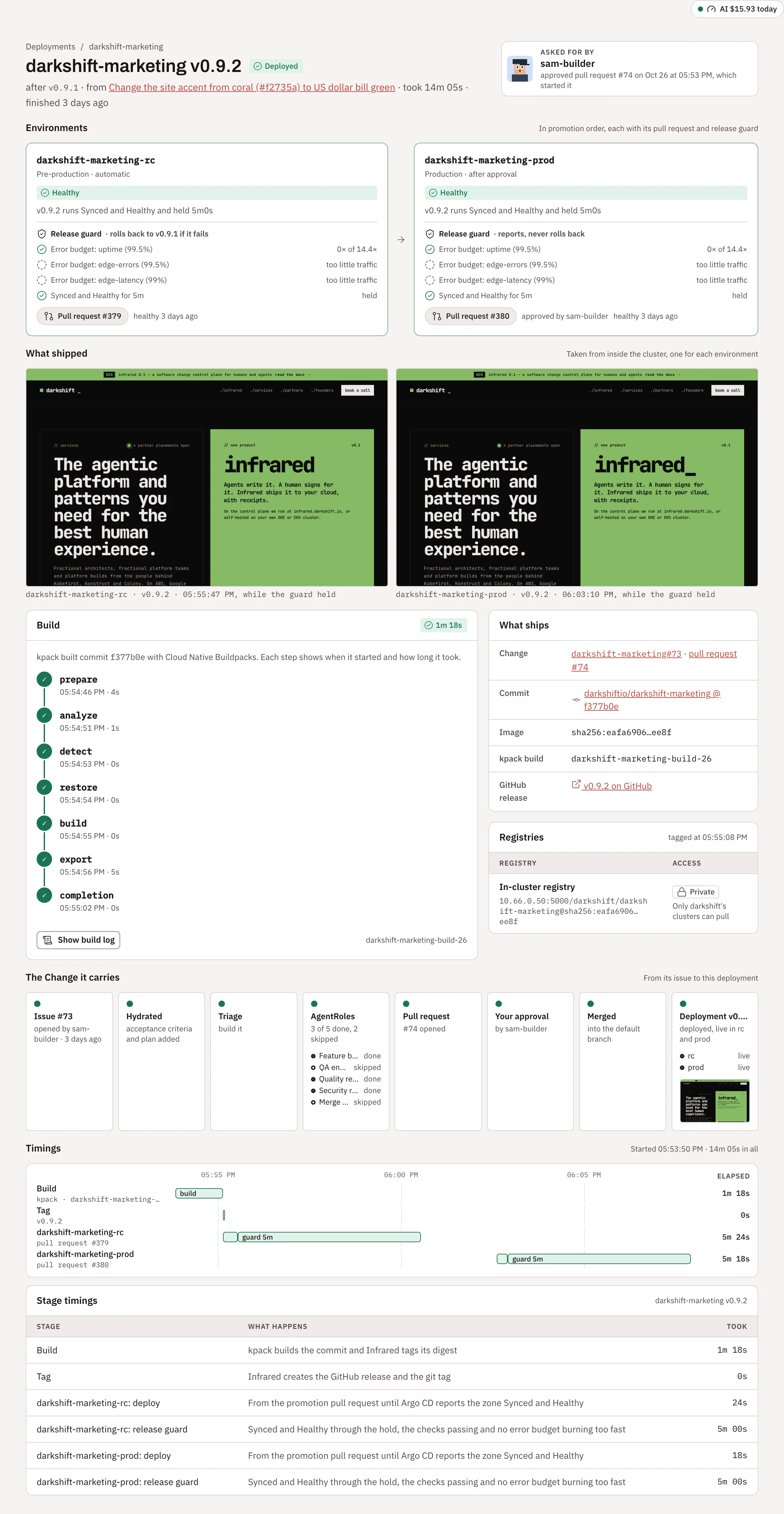
The header names the Product and version with its state, the version it follows, the Change it ships (or started by hand), and how long it took. On a retried deployment, it says which attempt this is and who retried it. On the right, Asked for by names who asked for it, and how:
- the person whose approval merged its Change: "approved pull request #22, which started it";
- the person who started the Change, when its merge was approved automatically: "asked for it in zippy#21";
- the person who pushed, for a deployment a push started: "pushed to
zippy", or "3 pushes tozippy, by alex and sam"; - the person who started it by hand: "started it by hand";
- Infrared started it, when Infrared started the Change on its own, on a schedule or for a failing CI run.
People are named by their GitHub login or their name in Infrared, never by an email address.
Below the header, a callout says what is happening or what waits for you: an approval, a failure with Retry, the build in progress (kpack is building <version>, the step it is on, and how long the Product's builds usually take), or a hold with Go now. Then the page has these sections:
- Environments: each zone in promotion order, as Pre-production or Production, automatic or after approval, with its state, its pull request, its release guard (each check, each SLO's error budget reading and the hold), who approved it and when it became Healthy.
- What shipped: a screenshot of each environment.
- Build: kpack's steps as they run (prepare, analyze, detect, restore, build, export and completion), each with its time, and why a step failed. Show build log shows the last lines of each step. kpack keeps the logs of its newest builds only, and the page says so when a log is gone.
- What ships: the Change with its pull request, and who asked for it when that's someone else; the commit, the image digest, the kpack build and the GitHub release. Registries says which registry the image went to and who can pull it.
- The Change it carries: the Change's journey, from its issue to this deployment.
- Timings: where the time went.
Environment states
| State | What is happening |
|---|---|
| Pending | Waiting for the build and the tag, or for the zone before it to pass its guard |
| Waiting for approval | Waiting for a person to approve production |
| Opening pull request | Infrared is opening and merging the pull request that pins the new version |
| Syncing | Argo CD is bringing the zone to the new version |
| Smoke check | Infrared is checking the zone's URLs |
| Holding | The release guard is watching the zone, with the time left |
| Healthy | The zone runs the new version, and its guard passed |
| Failed or Failed its guard | The zone failed; the deployment stops here |
Rolling back to <version>, Rolled back to <version> | The guard failed and the zone is going back to what it ran before |
Approve a promotion
Production waits for a person by default. When a deployment reaches a zone that needs approval, the zone shows Waiting for approval, the count beside Changes in the navigation goes up, and the deployment's page says Waiting for approval to promote to <zone>: the version runs Healthy in every zone before it, so check it there, then approve.
Choose Approve: promote <version> to <zone> in the callout, or Promote to <zone> on the zone itself. Infrared records who approved, opens and merges the zone's pull request, and waits for Synced and Healthy. A member of the org or more may approve. A Change waiting on that approval finishes once production is Healthy.
When a Product gains a zone after its newest deployment finished, that deployment's page offers Promote <version> to <zone> to send the same build there, with nothing rebuilt.
With ir, ir deployment promote <deployment> --zone <zone> --wait. With the API, POST /v1/orgs/<org>/releases/<deployment>/zones/<zone>/promote.
A Product whose human approvals are off promotes to production as soon as pre-production is Healthy, and records Infrared (human approvals off) as the approver.
What can hold production
An open issue labelled infrared:blocks-release on any of the Product's repos holds every promotion to production, before anyone is asked to approve it. On a brand-new app, a reviewer's finding the builder didn't fix becomes such an issue: you can see your app in pre-production while production waits for the fix. The zone's message names the issues that hold it. Once they are closed, production takes the newest deployment; an older one that was held meanwhile steps aside rather than ship ahead of the fix. When Infrared can't read a repo's issues, it holds production and says why: it never promotes without having looked.
The release guard and Go now
A zone isn't done when Argo CD reports it Healthy: its release guard watches it first. It runs the zone's checks, holds the zone for a while (5 minutes unless the environment says otherwise), and reads its SLOs' error budgets during the hold. Each environment deploys Guarded, with that hold, or Fast, with checks but no hold. See Guarded or Fast.
While the guard holds a zone, the deployment's page says how much of the hold is left, with Go now. Go now ends the hold early: the guard reads the error budgets and runs the checks once more, then moves on. It skips no check, so a burning error budget or a failing check still fails the zone. Infrared records who pressed it, and the page says so with Went ahead. A member of the org or more may press it, and a platform admin on a deployment that upgrades Infrared itself. With ir, ir deployment go <deployment> --zone <zone>. See Go now.
When something goes wrong
A failed zone rolls back by itself. When a zone fails its release guard, what happens next is the environment's choice. With rollback on (the default for a zone Infrared adds), Infrared puts back what the zone ran before through a pull request to the gitops repo, and the zone reads Rolling back to and then Rolled back to that version, with a link to the rollback's pull request. With rollback off, the new version keeps running and the zone reads Failed its guard: choose this where deployments run database migrations a rollback can't undo. Either way, the deployment stops there and its page says why, check by check. See When a zone fails its guard.
A failed deployment can be retried. Retry starts it again from where it failed. What it already did stays: the version, the image tag, the GitHub release and every zone that runs it Healthy. With ir, ir deployment retry <deployment>.
A failed deployment can be dismissed. While no zone runs it, Dismiss removes it from the list after you confirm. Nothing it did on GitHub or in the registry is undone.
To roll back by hand, revert the zone's promotion pull request in the gitops repo; Argo CD goes back to the previous digest, which the registry keeps. See Roll back.
The delivery strategy
How a Product's deployments ship is chosen in its settings (Product settings, under Delivery), by org admins:
- Isolated, the default: each deployment ships one commit of the Product's delivery repo and pins its image into every environment.
- Umbrella: each deployment ships one version of the Product's umbrella chart, with every repo's newest build (or its previous image, when it has no new one). Every environment deploys that chart version, and a rollback puts back the previous one.
A change takes effect at the next deployment; until then every environment keeps what it runs. See Deliver several repos as one chart.
Timings
The deployment's Timings show where its lead time went: a lane per stage on a timeline, and a table of each stage's time.
| Stage | From | To |
|---|---|---|
| Build | The deployment starts | kpack has built the commit and Infrared tagged its image |
| Tag | The build is ready | The git tag exists |
<zone>: deploy | The promotion pull request | Argo CD reports the zone Synced and Healthy |
<zone>: smoke check | Healthy | The zone's smoke check passes |
<zone>: release guard | The hold starts | The guard passes the zone, or fails it |
<zone>: rollback | The zone failed its guard | The zone runs what it ran before, Synced and Healthy |
A zone whose hold someone ended with Go now says so on its guard's lane and in its row. The deployment records the times as status.builtAt and status.taggedAt and, for each zone, startedAt, healthyAt and verifiedAt, its guard's holdStartedAt, wentAheadAt, passedAt and failedAt, and its rollback's startedAt and finishedAt.
What shipped
Once a zone passes its smoke check, Infrared opens its site in a headless browser from inside the cluster and keeps a 1280×800 screenshot, so you see what people see without signing in to a preview. In a Guarded zone it is taken during the hold. Each screenshot shows under What shipped with its environment, version and time, and on the Change that carried the deployment. Until then, a zone's place says Appears when <zone>'s smoke check passes.
Infrared screenshots the root of the zone's smoke check URL, or the Service the scaffolded chart creates (http://<product>.<zone>.svc.cluster.local/). A zone on another cluster without a smoke check URL gets no screenshot yet. Neither does a zone a newer deployment replaced, or one that rolled back or failed before its screenshot was kept, and the page says why. A retry that runs the zone again takes a new one.
With ir and the API
ir | API | Does |
|---|---|---|
ir deployment list [--product <product>] | GET /v1/orgs/{org}/releases | Lists deployments, newest first |
ir deployment get <deployment> | GET /v1/orgs/{org}/releases/{name} | Shows one: who asked for it, its build, its tag, and each zone's pull request, health and hold |
ir deployment new --product <product> | POST /v1/orgs/{org}/releases | Starts one |
ir deployment promote <deployment> --zone <zone> [--wait] | POST /v1/orgs/{org}/releases/{name}/zones/{zone}/promote | Approves a promotion |
ir deployment go <deployment> --zone <zone> [--wait] | POST /v1/orgs/{org}/releases/{name}/zones/{zone}/go | Ends a zone's hold now |
ir deployment retry <deployment> | POST /v1/orgs/{org}/releases/{name}/retry | Starts a failed deployment again from where it failed |
ir deployment build-log <deployment> | GET /v1/orgs/{org}/releases/{name}/build/logs | Prints the kpack build's log |
ir deployment wait <deployment> --for released | Waits until it is deployed, waits for approval (--for awaiting-approval), or runs Healthy in a zone (--zone) | |
DELETE /v1/orgs/{org}/releases/{name} | Dismisses a failed deployment that runs nowhere | |
GET /v1/orgs/{org}/releases/{name}/artifacts | Lists its environments' screenshots |