Triggers and scheduling
An AgentWorkflow's triggers say when it runs. Once they are set up, agents pick up work as it appears: a new issue gets hydrated, a pull request gets reviewed, a red default branch gets triaged, and you hear about it when something needs you.
A trigger of type adhoc only says a person may start the AgentWorkflow: Ask for a change on a Product's page, ir run start, or POST /v1/orgs/{org}/agentworkflowruns. These start runs on their own:
| Trigger | Starts a run when | Needs |
|---|---|---|
event on an issue | An issue on a Product repo is opened or labelled | The GitHub App's webhook |
onChange | A pull request on a Product repo is opened, reopened or gets new commits | The GitHub App's webhook |
event: ci.failed | A check fails on a Product repo's default branch with no Change in flight | The GitHub App's Checks: read permission |
event: release.cut | You cut a release of a Product | Nothing more |
cron | A schedule comes due | The org's scheduled runs switched on |
Only enabled AgentWorkflows start. A run always belongs to one Product: the one whose spec.repos lists the repo the event came from.
Events
| Event | Fires when |
|---|---|
issue.opened | An issue is opened. Issues opened by a bot, Infrared's own included, are skipped. |
issue.labeled | An issue gets a label. |
ci.failed | A check fails on a default branch with no Change in flight. See The QA engineer. |
release.cut | A release is cut. See Release cuts. |
Pull requests start AgentWorkflows through onChange, not through an event. Other event names that appear in the catalog, such as zone.promoted and conflict.detected, are reserved: Infrared doesn't raise them yet.
Issues
A trigger with labels narrows the match. For issue.labeled, the label just added must be in the list; for issue.opened, the issue must carry one of them. Pull requests, which GitHub also reports as issues, never count as issue events.
triggers:
  - type: event
    event: issue.labeled
    labels: [needs-hydration]
Two catalog AgentWorkflows listen for issues:
| AgentWorkflow | Triggers | Ships |
|---|---|---|
| Change (quick) | issue.opened; issue.labeled with infrared:todo-agent or needs-hydration | Enabled |
| Issue hydration | issue.opened; issue.labeled with needs-hydration | Disabled |
As the catalog ships, every new issue on a Product repo starts a Change (quick) run. The architect hydrates the issue, and the run waits for you to triage it. An issue labelled infrared:todo-agent (moved to Todo: agent) skips hydration and goes straight to building. If you want issues hydrated without starting a Change, enable Issue hydration instead.
Pull requests
onChange fires when a pull request is opened, reopened or synchronized (new commits pushed to its branch). The run's Change is that pull request. Two filters narrow it:
| Filter | Matches when |
|---|---|
branches | The pull request's base branch matches one of the globs, such as main or release/*. |
labels | The pull request carries one of the labels. |
Pull requests from branches named infrared/* are skipped: those are the branches agents work on, already inside a run.
triggers:
  - type: onChange
    branches: [main]
The catalog's Change AgentWorkflow has an onChange trigger with no filters, so while it is enabled every pull request to a Product repo gets the full review. Disable it, or add filters, if you want reviews on some pull requests only.
One run at a time
An event doesn't start a second run of the same AgentWorkflow for the same issue or pull request while one is still going. New commits on a pull request under review don't pile up runs; the next event after the run finishes starts a fresh one.
Closing stops the work
Close an issue on GitHub and Infrared cancels every unfinished run working on it. Close a pull request without merging and Infrared cancels the runs working on that pull request. The run ends Cancelled with the reason, for example issue #42 was closed on GitHub, so you never wonder why an agent stopped. A run whose own merge closed the issue (Closes #42) carries on with its deployment.
Connect the webhook
Issue and pull request triggers need GitHub to send events to Infrared, through the GitHub App the setup wizard created. You need to be an owner of the GitHub organization.
Settings → GitHub App in Infrared walks you through it: it shows what is set up (the installation, the OAuth client, whether Infrared holds a webhook secret), the callback and webhook URLs to copy, and an Edit on GitHub link. On GitHub, the App's settings are under Settings → Developer settings → GitHub Apps → infrared-<platform org> → Edit, with the General, Permissions & events and Advanced tabs used below.
-
Give Infrared a public URL. See Expose Infrared over HTTPS.
-
Give the webhook a secret. GitHub signs every delivery with the App's webhook secret, and Infrared rejects any delivery whose
X-Hub-Signature-256doesn't match. A platform admin chooses Generate the webhook secret under Settings → GitHub App (orPOST /v1/orgs/{org}/github-app/webhook-secret). Infrared stores it and shows it once, for you to paste into GitHub; keep a copy in your secret store too.The secret lives in the Secret
github-app, keywebhook-secret, in the platform org's namespace. To make one yourself instead, this stores it and copies it to the clipboard without printing it (macOSpbcopy; use your platform's clipboard tool elsewhere):secret=$(openssl rand -hex 32)kubectl -n ir-org-<platform org> patch secret github-app --type merge \-p "{\"data\":{\"webhook-secret\":\"$(printf %s "$secret" | base64)\"}}"printf %s "$secret" | pbcopyunset secretIf the key already holds a value (an App created with a webhook on a public URL), skip this step and leave the App's secret as it is.
-
General tab. Under Webhook, check Active, set Webhook URL to the address below, paste the secret into Webhook secret, and choose Save changes.
https://<host>/api/v1/webhooks/github -
Permissions & events tab. Under Subscribe to events, at the bottom, check Issues and Pull request, and Push if it isn't checked already (a person's push to a Product's default branch starts a deployment), then save. The section appears only once the webhook is active, and each event appears only when the App has the matching repository permission higher up the page, which the wizard grants. If you raise a permission, GitHub asks the organization to accept it on the installation before it applies.
-
Check it. On the Advanced tab, open Recent Deliveries and Redeliver the latest one (GitHub sends a
pingwhen the webhook turns on). Infrared answers 202 when the signature matched, whether or not the event started a run, and 401 when it matched no org's webhook secret. The API log saysGitHub webhook acceptedorGitHub webhook rejected.
Once events arrive, every enabled AgentWorkflow with a matching trigger starts on its own. With the catalog as it ships, that is change on each pull request and change-quick on each new issue. Both spend model tokens; disable either under Workforce → Agents → AgentWorkflows if you don't want that yet.
Release cuts
When you cut a release, Infrared starts every enabled AgentWorkflow in the org with an event: release.cut trigger, once, for that Product and version. The release's page lists the runs it started under Runs it started, and its status records them in status.cutRuns. The catalog's Release AgentWorkflow answers it and ships disabled.
Scheduled runs
A cron trigger takes a standard five-field schedule, or a descriptor such as @daily:
triggers:
  - type: cron
    schedule: "0 6 * * *"
At each scheduled time, Infrared starts one run per Product in the org (every Product with at least one repo). A scheduled run has no issue or pull request, so its AgentRole steps work in report mode. Scheduled runs are off for every org until an org admin turns them on, because each run spends model tokens.
Turning them on starts every enabled AgentWorkflow with a cron trigger, for every Product. Before you do, check which ones are enabled under Workforce → Agents → AgentWorkflows, where each shows its schedule, and disable any you don't want. The Daily audit, for example, runs every day at 06:00.
Two scheduled AgentWorkflows work differently:
- A Team's Daily status runs once a day for each Team that turns it on, at the Team's own hour, rather than once per Product. See Workforce.
- The QA weekly sweep runs on Mondays at 07:00 whether or not scheduled runs are on, because its weekly budget, not the switch, bounds what it spends. Any AgentWorkflow whose
budgetsaysscheduled: trueworks this way (The QA engineer). It never runs on the platform Product.
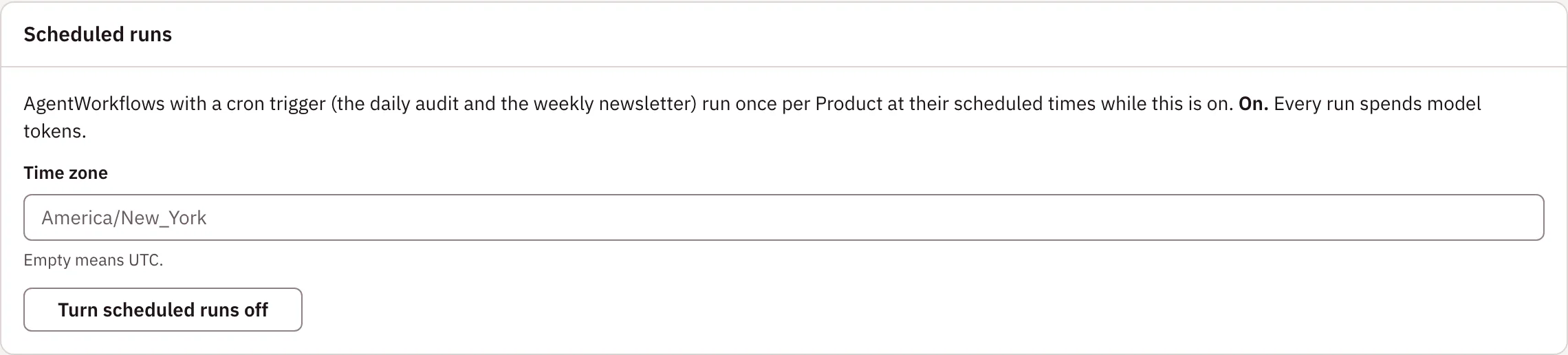
Turn them on. An org admin opens Settings → Scheduled runs, sets the Time zone the schedules are read in (for example America/New_York; empty means UTC) and chooses Turn scheduled runs on. The panel says whether scheduled runs are on or off.
Or with ir scheduling set --enabled=true --time-zone America/New_York, or the API:
curl -X PUT https://<host>/api/v1/orgs/<org>/scheduling \
  -H "Authorization: Bearer $INFRARED_TOKEN" -H 'Content-Type: application/json' \
  -d '{"enabled": true, "timeZone": "America/New_York"}'
This sets spec.scheduling on the Organization. Each AgentWorkflow with a cron trigger then shows its schedule and next run in status.schedule and status.nextScheduledAt, and the AgentWorkflows view shows the same line. While scheduling is off, or the AgentWorkflow is disabled, status.schedule says so and no next run is set.
Infrared catches up at most one missed time: if the control plane was down across several scheduled times, one run starts when it is back. The first time you turn scheduling on, an AgentWorkflow whose last scheduled time has passed since it was created runs right away.
Follow-up issues from report steps
A step in report mode (a scheduled run, or a run started by release.cut) can report one finding for your team to act on. Infrared opens it as an issue on the Product's backlog, labelled infrared:backlog, needs-hydration and source:<AgentRole>. Because the same AgentWorkflow runs again at every release or every scheduled time, Infrared makes sure your backlog doesn't fill with the same finding twice:
- The agent sees what's open. The step's prompt lists the repo's open issues (the newest 50), and the agent is told to name an issue that already covers its finding instead of proposing it again.
- Similar titles are one issue. Before opening the issue, Infrared reads the repo's open issues again. If one has a similar title, it adds the finding to that issue as a comment. Titles are compared by their words, ignoring case, punctuation, version numbers and small words like "add" or "the", so "Add a CHANGELOG.md covering v0.1.0 through v0.2.1" and "Add a Keep a Changelog CHANGELOG.md covering v0.1.0 to v0.2.2" count as the same issue.
- One open follow-up per AgentRole. While an issue labelled
source:<AgentRole>is open on the repo, that AgentRole's next finding is added to it as a comment, whatever its title. Close or finish the issue and the AgentRole can file a new one.
The step's evidence says which happened: Issue #N for a new issue, or Follow-up already open: #N for a comment. A step whose output goes to Slack instead (deliver: slack) opens no issue.
Merge conflicts in a run
A step's when can be pullRequest.conflicted: true when GitHub reports that the Change's pull request can't merge cleanly into its base branch. The step runs only then, and is Skipped otherwise.
In the catalog's Change (quick) AgentWorkflow, the resolve-conflicts step, after human approval and before the merge, runs the merge conflict resolver under that condition. If the base branch moves again and the merge step finds the pull request conflicted, the run goes back to that step and continues from there, up to 3 rounds. After the third, the merge step fails and the run is dead-lettered to a person. The AgentWorkflowRun counts the rounds in status.conflictRounds.