Linked accounts and git connectors
People who sign in with Google link the git accounts they work with to their Infrared user. A linked GitHub login is what puts a person on the GitHub teams Infrared keeps for their access groups, so they get the right repos on GitHub without anyone adding them by hand.
Platform admins choose the forges people can link on. Each one is a git connector: GitHub, GitLab or Gitea, at any address.
Link your account
- Open You from your name at the foot of the rail. Under Git accounts, choose Link and the connector, such as Link GitHub.
- The forge asks you to sign in there, if you aren't, and to allow Infrared. For GitHub through an org's App, it asks you to authorize the App.
- You're back on You, which says "Your GitHub account is linked" and names the login.
Infrared reads the account's numeric ID and login once, then drops the forge's token: it keeps no token. If linking fails, You says why under Linking didn't work, such as "The link expired or was opened in another browser: start again."
- An account links to one person on the install. Linking one that someone else has linked is refused: "That account is linked to another person here. They unlink it, or a platform admin does in Access, People."
- Linking again on the same connector replaces your account there.
- Unlink removes one of yours. A platform admin unlinks anyone's in Access → People, with Manage, then Unlink.
The root user and people signed in with GitHub link nothing: You says "Linking is for people who sign in with Google".
What a linked GitHub login does
A GitHub login counts when it's linked on a GitHub connector at the address of the platform org's GitHub App, such as https://github.com. Such a login:
- joins the GitHub teams Infrared keeps for the access groups whose Workspace groups hold you (GitHub teams);
- gives you the role of an access group with no Workspace group whose GitHub logins include it;
- is assigned the issue on GitHub when you move it to Doing;
- no longer signs in with GitHub on its own. Sign in with GitHub refuses it: "
<login>is linked to a person who signs in with Google here. Use Sign in with Google: a linked GitHub account is for git, not for signing in." Unlinking lets the login sign in with GitHub again, if an access group lists it.
Linked GitLab and Gitea accounts record where each person works. Access groups don't use them yet.
Git connectors
Access → Git connectors lists the forges people link their accounts on. Each shows its git host and address, how it links, the callback address to register on the forge, when it was last checked, whether it's Ready, and how many people linked through it, with Check, Edit and Delete.
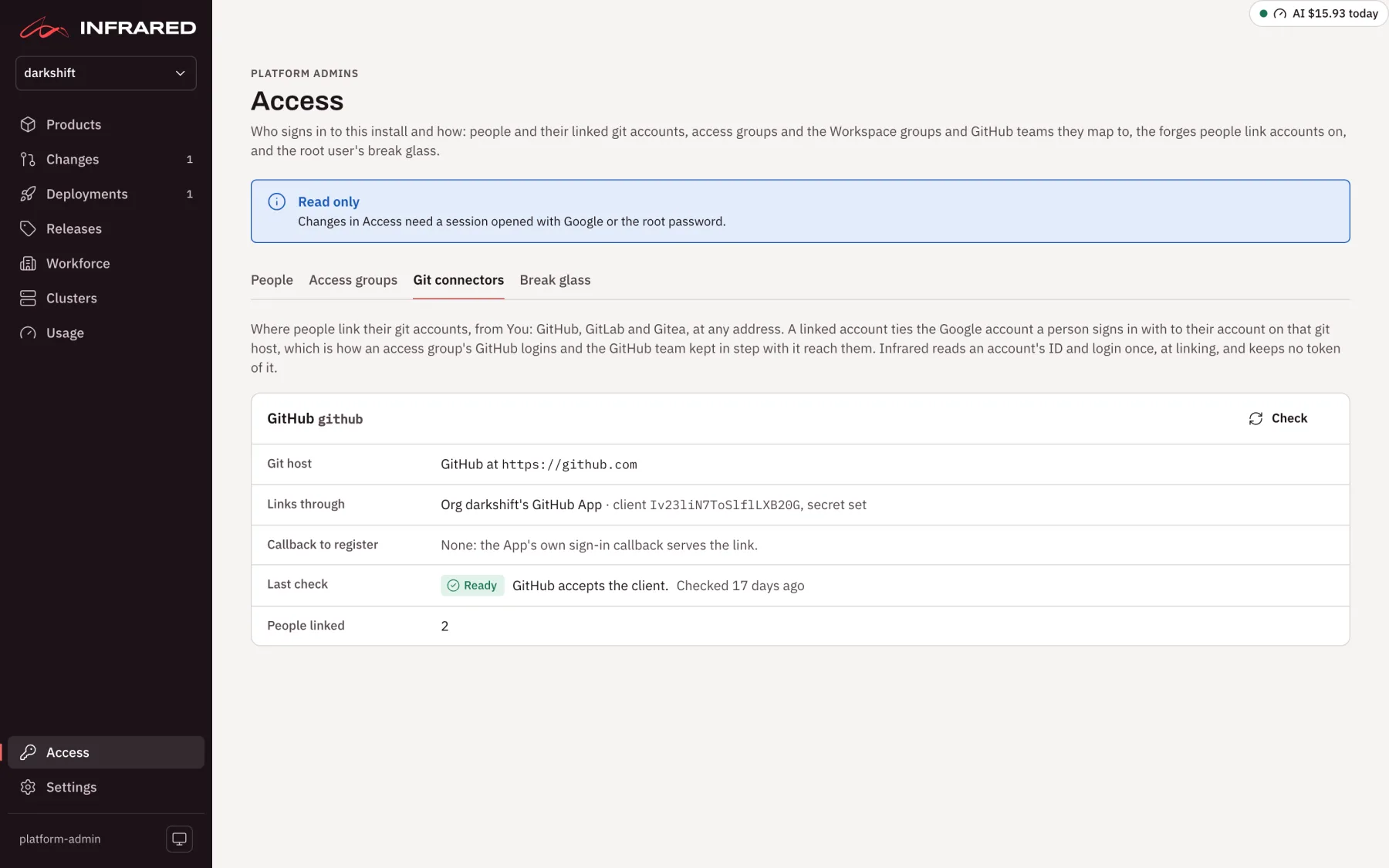
Add a git connector
Choose Add a git connector, then fill in:
- Git host: GitHub, GitLab or Gitea.
- How it links: one of the choices for that host, below.
- Name: a DNS label, unique on the install, such as
gitlab-com. A connector keeps its name. - Display name: what people see on their Link button, such as Link GitHub.
- Address: the forge's address in a browser, such as
https://github.com,https://gitlab.comorhttps://git.example.com. A forge under a path, such ashttps://example.com/gitlab, works too.
Choose Add git connector. Infrared saves the connector and checks it at once.
| Git host | How it links | Infrared asks the forge for |
|---|---|---|
| GitHub | An Infrared org's GitHub App, the platform org's first: nothing to make on GitHub, or an OAuth application you make on GitHub. | No scope: only the account's own ID and login. |
| GitLab, at gitlab.com or your own | An OAuth application you make on GitLab. | read_user |
| Gitea | An OAuth application you make on that Gitea, or Infrared's own Gitea: Infrared registers the application. | read:user |
GitHub through an org's App
This is the simplest way for GitHub. Keep the address https://github.com (or your GitHub Enterprise Server's), and under Infrared org (not the GitHub organization) keep the platform org. The App's own OAuth client links the accounts, and its sign-in callback, https://<host>/api/v1/auth/github/callback, brings people back: the same one Sign in with GitHub needs.
An OAuth application on the forge
For GitLab, for a Gitea of your own, or for GitHub without the App, make an OAuth application on the forge for Infrared:
- In the forge's settings, add an OAuth application: Applications on GitLab, Applications under OAuth2 applications on Gitea, or Developer settings → OAuth Apps on GitHub. Name it
Infrared, and make it confidential where the forge asks. On GitLab, give it the scoperead_user. - Register the callback address the form shows,
https://<host>/api/v1/me/links/<name>/callback, for each address people open Infrared at. - In Infrared, paste the application's Client ID and Client secret, and choose Add git connector.
Infrared keeps the client secret in the Secret infrared-git-connectors in its namespace and never shows it back. When you edit the connector later, leave Client secret empty to keep the one stored.
Infrared's own Gitea
When the install runs its own Gitea, Infrared can register the application itself. Set the chart value gitea.browserURL to the address browsers open that Gitea at, such as https://git.example.com, then choose Gitea and Infrared's own Gitea: Infrared registers the application. Infrared registers an OAuth application named Infrared on its Gitea, with the callback for the address you saved it from. Saving it again from another address adds that address's callback, and Gitea gives the application a new secret.
Without gitea.browserURL, Infrared refuses: a Gitea that only the cluster can reach can't link anyone.
Check or delete a connector
Check asks the forge to redeem a code it never issued. No person takes part, and nothing is linked. A forge that knows the client refuses only the code, so the connector is Ready, such as "GitHub accepts the client." A forge that doesn't know the client refuses it, so the connector is Not ready, with what the forge said and "check the client ID and secret, and the callback address on <forge>".
Delete removes a connector and its stored secret. While anyone has an account linked through it, Infrared refuses: "<n> people have an account linked through <name>: they unlink it, or a platform admin does in Access, People, first".