Domains and addresses
Every environment with an address gets one under the installation's platform domain (for example https://<product>-rc.apps.example.com). An org can add more domains and give any environment extra addresses under them, such as www.acme.com for production.
The domains an org can use
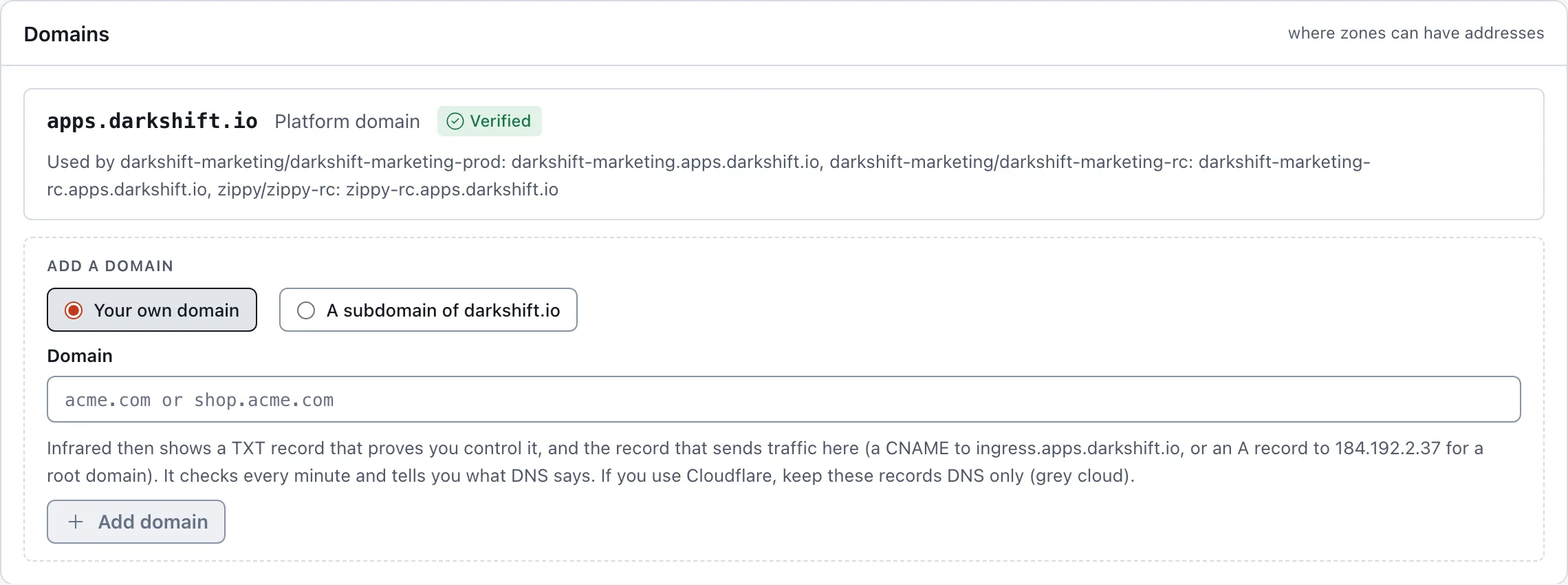
Org Settings → Domains lists them, each with its kind, its status (Waiting for DNS, Verified or Failed), when Infrared last checked it, and the addresses that use it. Org admins add domains below the list.
| Kind | What it is | Who sets up DNS |
|---|---|---|
| Platform domain | The installation's domain, shared with every org | Infrared's operators, once |
| Managed by Infrared | A subdomain of a root the installation manages, such as acme.example.com | Infrared creates acme.example.com and *.acme.example.com itself |
| Your domain | A domain the org owns, such as acme.com or shop.acme.com | You, at your DNS provider, with the records Infrared shows |
Any org may claim a managed subdomain or add its own domain; the first org to claim a name keeps it. Only the platform org's domains can be shared with every org. Some names can't be claimed under a managed root because the platform uses them (www, api, docs, app, apps, status, admin, auth, login, dev, staging, prod and similar). Managed subdomains are offered only when the installation has set up managed roots (see Set up the platform domain).
Add your own domain
- Under Add a domain, choose Your own domain, type it (for example
acme.comorshop.acme.com), and choose Add domain. - Under Add at your DNS provider, Infrared shows the records to add, each with its type, name and value, a copy button and what it's for:
- a TXT record at
_infrared.<domain>withir-verify=<token>: proves your org controls the domain. Leave it in place; Infrared keeps checking it. - a CNAME from the domain to the installation's ingress host, or an A record to its IP for a root domain like
acme.com(a root can't have a CNAME; an ALIAS or CNAME flattening to the ingress host works too). Add one like it for each address you use under the domain, or a wildcard*.<domain>.
- a TXT record at
- Infrared checks DNS every minute while the domain waits (Check now checks at once) and says in plain words what it found:
- Ownership: whether the TXT record is there and has the right value.
- Traffic: whether the domain reaches Infrared, points somewhere else, or doesn't resolve yet.
- Certificates: whether a CAA record would stop Let's Encrypt from issuing certificates.
Once the TXT record is found the domain is Verified and can be used for addresses. Infrared keeps checking it every half hour; if the TXT record disappears, it says to put it back before the domain's certificates renew.
If your DNS is on Cloudflare, keep these records DNS only (the grey cloud). Through Cloudflare's proxy, traffic and certificate checks don't reach Infrared, and Infrared says so.
Claim a subdomain
Under Add a domain, choose A subdomain of <root>, type a name, and choose Claim <name>.<root>. Infrared creates its DNS records (the name and a wildcard under it), so it is Verified within seconds. A reserved name, or one another org or an existing DNS record already has, fails with a message that says so. Removing the subdomain removes the records.
Remove a domain
Remove, on a domain the org added, takes it away after you confirm. Zones can no longer use addresses under it, so Infrared refuses while an environment still has one. Records you added at your DNS provider stay until you delete them.
Give an environment more addresses
Product → Settings → Instances, under an environment's Address:
- Type a Name (for example
www, or nothing for the domain itself) and pick a verified Domain. The platform domain is in the list too; an address under it needs a name, since the domain is shared. - Infrared shows the full address and whether it's free across the installation, or who has it.
- Add address, then Save.
With no verified domain yet, the panel points you to org Settings → Domains.
Infrared writes the addresses into the zone's values through the gitops repo. The chart serves each one with its own Let's Encrypt certificate, behind the same sign-in (or public) as the environment's platform address. A domain can't be removed while an environment uses it.
API
| Call | What it does |
|---|---|
GET /v1/orgs/{org}/domains | The domains the org can use, with records, checks and the addresses under each |
POST /v1/orgs/{org}/domains | Add one: {"name": "acme.com", "kind": "external"} or {"name": "acme.example.com", "kind": "managed"} (org admins) |
POST /v1/orgs/{org}/domains/{domain}/check | Check its DNS now instead of at the next minute |
DELETE /v1/orgs/{org}/domains/{domain} | Remove it; refused while a zone has an address under it (org admins) |
GET /v1/orgs/{org}/addresses/available?host=www.acme.com | Whether an address is free |
An environment's extra addresses are spec.delivery.zones[].addresses on the Product: [{"domain": "acme.com", "name": "www"}].