Workload clusters
A workload cluster runs Products' zones away from the management cluster, in the cloud and region you choose. The management cluster stays in charge: its Argo CD deploys to every workload cluster from the gitops repo, so you deliver to a workload cluster exactly as you deliver anywhere else.
Platform admins register, build and delete clusters, and decide which orgs may use each one. They can also let an org's admins run clusters of the org's own (An org's own clusters).
The Clusters page
Clusters in the rail lists every cluster you can see, the management cluster first: its type, its template (or its provider and flavor), the orgs allowed on it, its health, its Kubernetes version, how many of your org's zones run on it, and how many nodes it has. A cluster being deleted shows Deleting and the step it's on.
Click a row to select a cluster. Below the list, its sync waves show what Argo CD runs on it, wave by wave; for the management cluster you can also see the platform layer by layer. Beside them, Zones lists your org's zones, with the selected cluster's highlighted. Open and the cluster's name, or the name itself, opens the cluster's page.
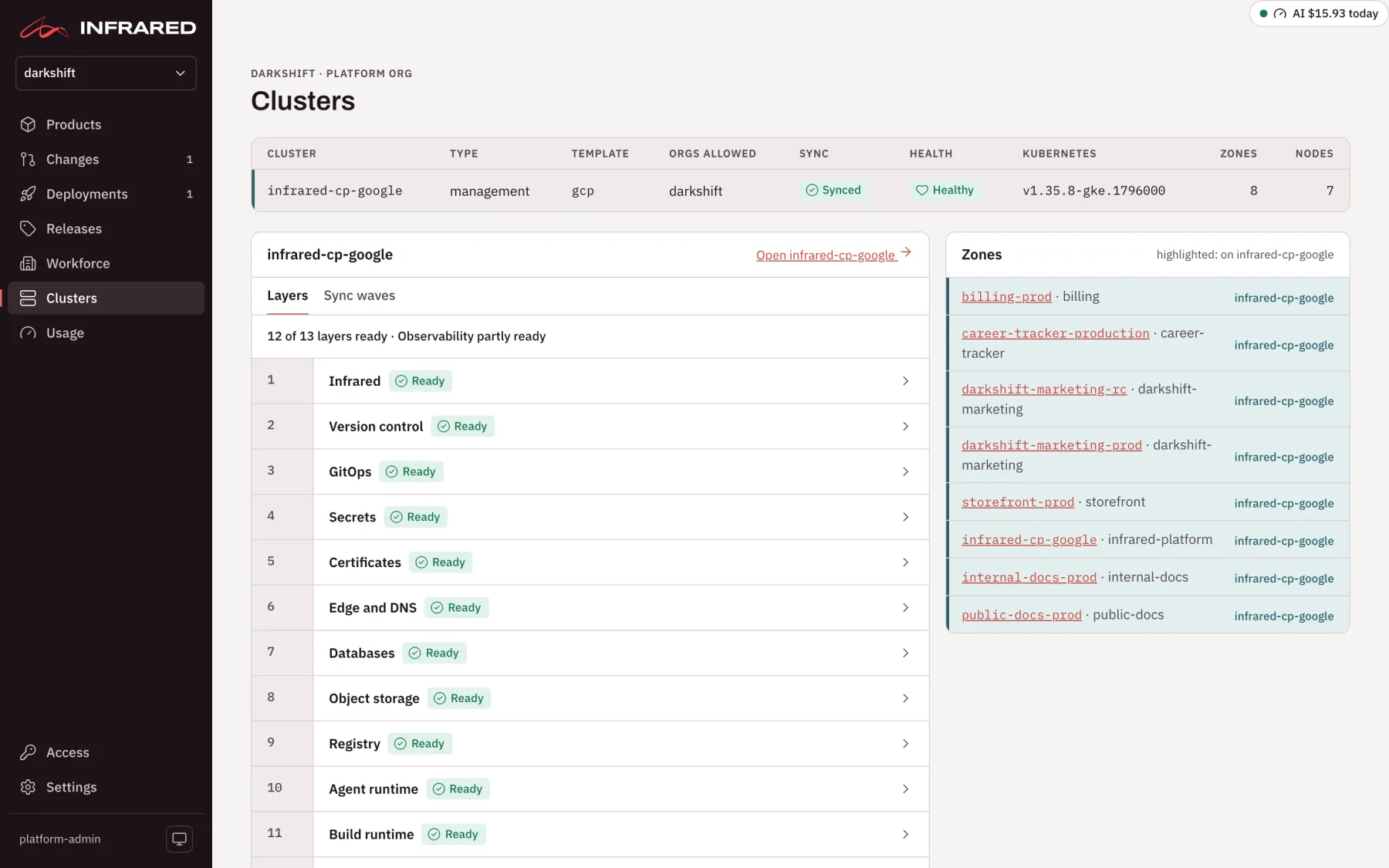
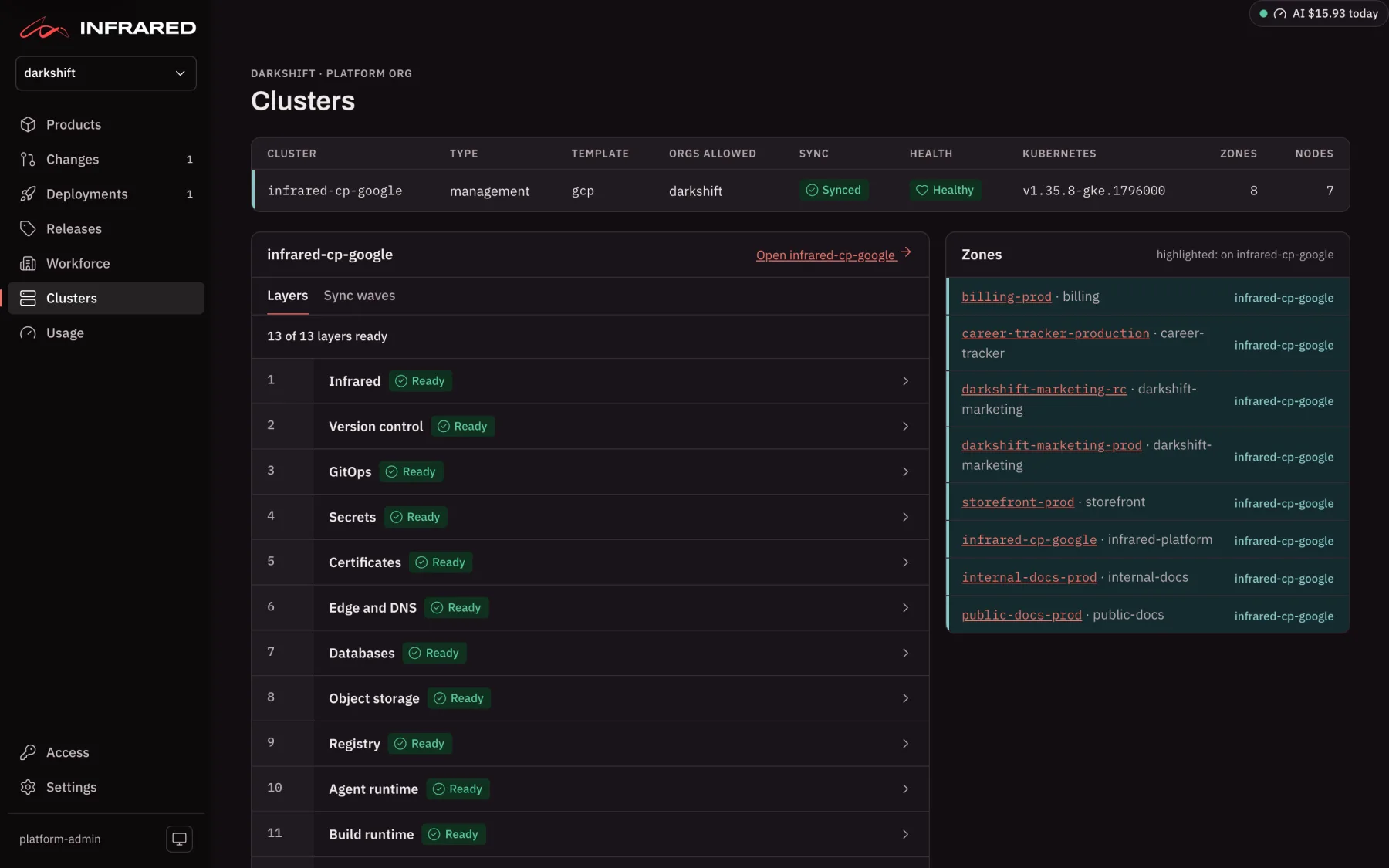
Platform admins find Register a workload cluster at the foot of the page.
An install whose orgs have no clusters of their own, such as a hosted install, can leave Clusters out of the rail. The page stays at /clusters. Set it in the install's values file in the gitops repo:
api:
  flags:
    hideClusters: true
What registering does
- Connected. Infrared reaches the cluster's API server and reads its Kubernetes version and node count.
- Argo CD. Infrared writes the Argo CD cluster Secret
cluster-<name>in namespaceargocd, so Argo CD can deploy to it. - Registered. Infrared opens and merges a pull request in the platform org's gitops repo. It adds the app-of-apps
registry-<name>under the management cluster's components, which syncs every Application inregistry/clusters/<name>/components, and a README for that directory.
The cluster's conditions Connected and Registered show each step, and the cluster's page lists every condition with its message and when it last changed.
The install's license may cap how many workload clusters it holds (Licensing).
Register a cluster you have
Infrared reaches a cluster you already run with a kubeconfig. Its user must carry a bearer token or a client certificate inline. Exec plugins (such as aws eks get-token), auth-provider plugins and token files are refused, because Argo CD needs a credential it can store. A ServiceAccount token bound to a ClusterRole that can deploy your zones works well.
In the UI. On Clusters, under Register a workload cluster:
- Enter a Name: lowercase letters, numbers and hyphens, at most 42 characters.
- Leave Belongs to on The platform, or pick an org to make it that org's own.
- Choose Connect a cluster you have and paste the Kubeconfig.
- Choose Register cluster.
Infrared keeps the kubeconfig in the Secret cluster-<name>-kubeconfig (key kubeconfig) in namespace infrared and never shows it again.
Through the API.
curl -X POST https://<host>/api/v1/clusters \
  -H "Authorization: Bearer $INFRARED_TOKEN" -H 'Content-Type: application/json' \
  -d "$(jq -n --arg kc "$(cat edge.kubeconfig)" \
        '{name: "edge-us-east-1", kubeconfig: $kc, flavor: "eks", provider: "aws", region: "us-east-1"}')"
As a resource.
apiVersion: infrared.darkshift.io/v1alpha1
kind: Cluster
metadata:
  name: edge-us-east-1
spec:
  type: workload
  flavor: eks
  provider: aws
  region: us-east-1
  connection:
    kubeconfigSecretRef:
      name: edge-us-east-1-kubeconfig   # in namespace infrared
      key: kubeconfig
The Cluster owns its kubeconfig Secret and its Argo CD cluster Secret, so removing the Cluster removes both. Set spec.server when Argo CD must reach the API server at a different address from the kubeconfig's. To watch it:
kubectl --context <management cluster> get cluster edge-us-east-1 \
  -o jsonpath='{range .status.conditions[*]}{.type}={.status} {.message}{"\n"}{end}'
:::note Try workload clusters without a second cluster
The API also accepts "inCluster": true. It registers the management cluster again under another name, with its own app-of-apps, so you can try allowlists and zones placed on a cluster with only one cluster. Argo CD uses its built-in destination, https://kubernetes.default.svc. The UI doesn't offer it.
:::
Build a cluster with OpenTofu
Infrared can build the cluster for you from a cluster template. It runs the template's OpenTofu module in a Job on the management cluster, then connects and registers the new cluster by itself, so there's nothing for you to run afterwards.
There are two cluster templates, both modules of infrared-iac-modules:
| Template | Cloud | What it builds | About, while it exists |
|---|---|---|---|
gcp/gke-cluster | Google Cloud | A zonal GKE Standard cluster in its own VPC: one node pool (Spot by default), private nodes behind Cloud NAT, an API endpoint open only to allowed_api_cidrs (or private), and Workload Identity. | $20.50 a month at the defaults (one e2-medium Spot node), or $93.50 when your billing account already has a zonal GKE cluster, since GKE's free tier covers one cluster's management fee. |
aws/eks-cluster | AWS | An EKS cluster in its own VPC across az_count zones with one NAT gateway: one managed node group (two t3.large, on-demand or Spot), an API endpoint open only to endpoint_public_access_cidrs, the EBS CSI driver, the load balancer controller's role, and cluster admins through EKS access entries. | $235 a month at the defaults (control plane $73, two nodes $121, NAT gateway $33, disks $8). |
The costs are list prices in us-central1 and us-east-1; your region and sizes change them. Each module's README in infrared-iac-modules lists every input.
In the UI
On Clusters, under Register a workload cluster:
- Enter a Name, and choose Build it from a template.
- Pick the Template (Google Cloud · GKE or AWS · EKS) and the Version, a tag of infrared-iac-modules.
- Pick the Cloud account: a Verified cloud account of that cloud. Infrared then mints short-lived credentials from it before each run and stores no key. For a platform cluster you can choose A credentials Secret instead (Credentials).
- Under Variables, one key=value per line, enter the template's inputs.
namedefaults to the cluster's name. Write lists and objects as JSON, such asallowed_api_cidrs=["198.51.100.7/32"]. - Leave Apply: build it now unticked to see the plan first, and choose Register cluster.
The cluster's page shows the OpenTofu run. Read the plan there, then choose Apply: build it (billable) under Details and Save.
:::caution Apply creates billable resources An apply creates real cloud resources in the account the credentials belong to, and they cost money until you destroy them. Delete the cluster through Infrared to take them all down. :::
As a resource
apiVersion: infrared.darkshift.io/v1alpha1
kind: Cluster
metadata:
  name: edge-us-east-1
spec:
  type: workload
  flavor: eks
  provider: aws
  region: us-east-1
  template:
    module: aws/eks-cluster
    version: v0.14.0
  provision:
    action: plan                 # plan (the default) or apply
    cloudAccount: prod-aws       # a Verified AWS cloud account of the platform org
    variables:
      name: edge-us-east-1
      region: us-east-1
      endpoint_public_access_cidrs: '["198.51.100.7/32"]'
For GKE, use provider: gcp, no flavor, template.module: gcp/gke-cluster, and variables such as project_id, region, zone and allowed_api_cidrs. POST /v1/clusters with template and provision and no kubeconfig does the same through the API.
| Field | What it means |
|---|---|
provision.action | plan shows what would be built; apply builds it. Default plan. |
provision.cloudAccount | A Verified cloud account of the platform org, of the same cloud as provider. Empty, the Job reads a credentials Secret you create. |
provision.variables | The module's inputs. A value that starts with [ or { is passed as JSON. |
provision.source | The module source. Empty means the template's module in infrared-iac-modules at template.version. |
provision.image | The OpenTofu image. Default ghcr.io/opentofu/opentofu:1.10. |
Credentials
With a cloud account, Infrared mints the Secret cluster-<name>-credentials in namespace infrared with short-lived credentials before each run, and deletes it when the run ends. You create nothing. The account must be Verified; until it is, the build waits and the cluster's page says so.
Without one, you create that Secret yourself: AWS_ACCESS_KEY_ID, AWS_SECRET_ACCESS_KEY and AWS_REGION for AWS, or GOOGLE_OAUTH_ACCESS_TOKEN and GOOGLE_PROJECT for Google Cloud, plus GIT_TOKEN to read a private module source. Create it before or after registering. Until it exists, the build waits, and the cluster's page shows the kubectl command:
kubectl --context <management cluster> -n infrared create secret generic cluster-edge-us-east-1-credentials --from-env-file=credentials.env
The OpenTofu run
Infrared runs one Job for each change to the cluster and each action, tofu-<cluster>-<generation>-<action>, in namespace infrared. The Job doesn't retry, and it's deleted a week after it finishes. OpenTofu keeps its state in the management cluster, in a Secret in namespace infrared. The cluster's page shows the run and its phase (Waiting for credentials, Running, Succeeded or Failed), and how to read its logs:
kubectl --context <management cluster> -n infrared logs job/tofu-edge-us-east-1-1-plan
When the apply succeeds, the cluster connects itself. GKE and EKS sign people in through their cloud's IAM, which a kubeconfig can carry only as an exec plugin, so the template makes a ServiceAccount kube-system/infrared bound to cluster-admin on the new cluster and writes a token kubeconfig for it. Infrared takes that kubeconfig and registration continues as above. Every cloud resource the template builds is labelled infrared-cluster=<name>, which the deletion's sweep looks for.
A cluster that someone else's OpenTofu built is registered with the template's register_with_infrared output instead.
Linode
You can register a Linode cluster you already run, LKE or k3s, by its kubeconfig, as for any other cluster. Infrared reads its provider as linode from its nodes. Backups can go to Linode Object Storage (Back up and restore).
There's no cluster template or cloud account for Linode, so Infrared can't build a Linode cluster for you.
Template conformance
Template conformance proves the cluster templates on a schedule, so you know a template still builds a working cluster before you rely on it. Each run builds a cluster from the template through a cloud account, waits until it's Connected and Registered, deploys a small page to it through Argo CD, checks the page answers through the cluster's own load balancer, then deletes the cluster and sweeps the cloud for anything left. A run of gcp/gke-cluster costs about $0.08 and one of aws/eks-cluster about $0.15.
A platform admin turns it on with a ConformanceSuite, which holds:
- the templates it proves, each with its module, version, provider, region, the platform org's cloud account it builds through, its variables, and
hourlyUSD, what its cluster costs an hour; - its schedule:
everyan interval, orattimes of day in UTC. A slot is skipped while the template's previous run is still going; monthlyCapUSD, a monthly cap the suite never runs past;- the workload each run deploys, and the text its page must contain;
- optionally, a Product of the platform org whose QA engineer triages a failed run.
Once a suite exists, Template conformance appears on Clusters. It shows each template's last result, what the suite has spent this month against its cap, and the newest runs with their steps: plan, apply, register, workload, delete and sweep. Platform admins and the platform org's admins can start a run with Run now, which bills until the run deletes its cluster. Through the API, GET /v1/conformance reads it and POST /v1/conformance/{suite}/templates/{template}/runs starts a run.
Place zones on a cluster
A platform admin first allows an org to use the cluster: tick the org under Orgs allowed on the cluster's page, or replace the org's allowlist through the API:
curl -X PUT -H "Authorization: Bearer $INFRARED_TOKEN" -H 'Content-Type: application/json' \
  -d '{"clusters":["edge-us-east-1"]}' https://<host>/api/v1/orgs/acme/cluster-allowlist
Then the org sets cluster on a zone in its Product's spec.delivery.zones:
spec:
  delivery:
    zones:
      - name: checkout-rc
        environment: pre-release
      - name: checkout-prod
        environment: release
        cluster: edge-us-east-1
A zone without cluster runs on the management cluster. For a zone with one, a deployment checks the cluster before it promotes:
| The cluster is | The deployment |
|---|---|
| Not on the org's cluster allowlist | Fails for that zone. |
| Not a cluster Infrared knows | Fails for that zone. |
Known but not Registered yet | Waits, and checks again every minute. |
Registered | Promotes. |
The zone's Application lives in that cluster's directory, registry/clusters/<cluster>/components/product-<zone>.yaml. Set applicationPath on the zone to use another path.
Infrared adds a new zone's files for you. When a zone has no values file or Application yet, Infrared copies them from a zone of the same environment, renames the zone and its namespace, points the destination at the zone's cluster, and merges the pull request. The new zone runs what the copied zone runs until the next Release promotes to it. A release zone is never copied from a pre-release zone, so it can't start on a version nobody approved: add the first release zone's files yourself. The Product's status.zoneFiles lists the zones Infrared added, and says when a zone is missing files and has none to copy.
On the Product's page, each environment says where it runs, such as Runs on edge-us-east-1 or Runs on the management cluster.
:::note No address on a workload cluster yet An environment on a workload cluster has no address yet: it's reachable only inside its cluster. Addresses, previews and extra domains apply to environments on the management cluster. :::
To write the Application yourself, point its destination at the cluster by name, and make sure its AppProject's destinations allow that cluster and namespace, or Argo CD refuses to sync it:
spec:
  project: products
  destination:
    name: edge-us-east-1
    namespace: checkout-prod
An org's own clusters
A platform admin can let an org's admins register and build workload clusters of the org's own, so the org runs its environments on its own cloud bill. Open the org's Settings, and in the Org panel choose Allow own clusters beside Own clusters. Or through the API:
curl -X PUT -H "Authorization: Bearer $INFRARED_TOKEN" -H 'Content-Type: application/json' \
  -d '{"enabled":true}' https://<host>/api/v1/orgs/acme/cluster-self-service
The org's admins then find Register one of acme's own clusters on Clusters:
- Connect a cluster you have: a kubeconfig with a ServiceAccount token or client certificate, everything inline, for the cluster's public HTTPS address. Infrared never dials a private address for an org's cluster.
- Build it from a template:
gcp/gke-clusteroraws/eks-cluster, through one of the org's own verified cloud accounts, so the cloud bill is the org's. A cloud account whose project or AWS account another org already added is refused.
An org's own cluster:
- belongs to the org, and the org's zones can go on it without the allowlist;
- keeps its directory,
registry/clusters/<name>/components, in the org's own gitops repo; - is seen only by the org's people and platform admins;
- is changed and deleted by the org's admins, from its page or through
/v1/orgs/{org}/clusters. If a platform admin stops allowing own clusters, the clusters stay, and only platform admins change them.
A platform admin can also register a cluster for an org, with Belongs to on Register a workload cluster, or org in POST /v1/clusters. That cluster is the org's own too. An org can't be deleted while it owns a cluster.
Infrared keeps cluster-admin on an org's cluster, as on every workload cluster.
A cluster's page
Open a cluster from Clusters to see everything about it in one place.
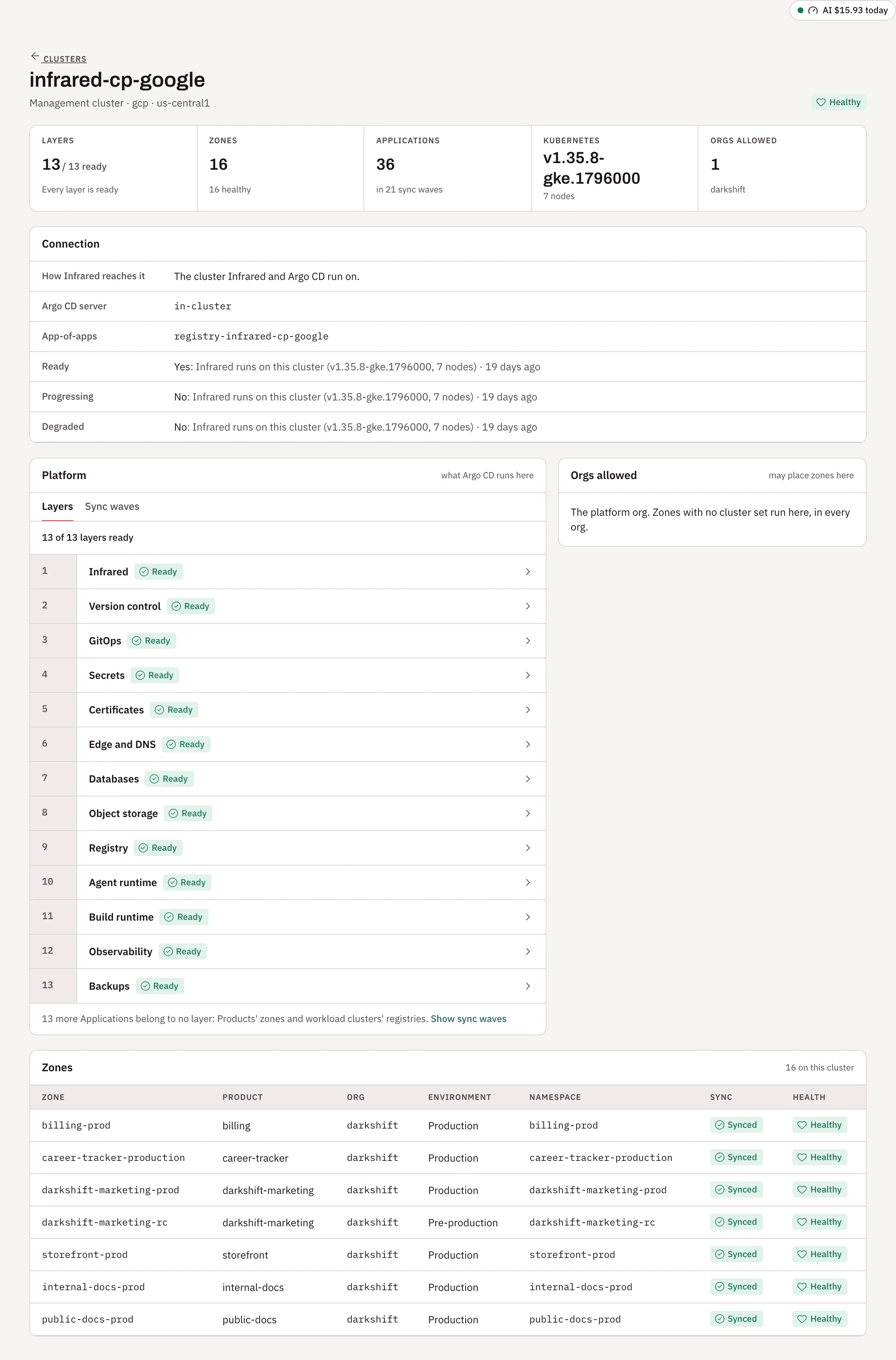
| Section | What it shows |
|---|---|
| At a glance | Zones and how many are healthy, Argo CD Applications and sync waves, the Kubernetes version and nodes, and the orgs allowed. |
| Connection | How Infrared reaches it, the Argo CD server, its app-of-apps (registry-<name>), the kubeconfig Secret, and each condition with when it last changed. |
| Cluster template | For a cluster built from a template: the module and version, the last OpenTofu run, and where its credentials come from, a cloud account or the Secret cluster-<name>-credentials. |
| Sync waves | What Argo CD runs on it, wave by wave. |
| Orgs allowed | Which orgs may place zones on it. Platform admins tick orgs on or off. |
| Zones | Every zone on it in the orgs you can see, with its Product, org, environment, namespace, sync and health. |
| Details | For a workload cluster, to platform admins and, on an org's own cluster, the org's admins: change the Provider, Region and Flavor, Replace the kubeconfig, and for a cluster built from a template the Version, the variables and OpenTofu: Plan: show what would change or Apply: build it (billable). Save runs OpenTofu again. |
| Delete cluster | For a workload cluster. See Delete a cluster. |
The management cluster's page has no Details or Delete cluster: setup describes it. Through the API, GET /v1/clusters/{name}/overview returns the page's data, and PATCH /v1/clusters/{name} changes a workload cluster, leaving out fields as they are.
Delete a cluster
Deleting a workload cluster takes it apart in the reverse of how it went up. The load balancers, disks and DNS records its controllers made in the cloud go with it, then Infrared destroys what the template built and checks the cloud for anything left behind. You don't have to hunt through a cloud console for stray resources that keep billing.
Platform admins and the platform org's admins can delete a workload cluster, and an org's admins can delete the org's own. The management cluster and the cluster Infrared runs on can't be deleted.
Under Delete cluster on the cluster's page, choose Delete and the cluster's name (such as Delete edge-us-east-1…). Infrared lists what goes:
- Environments go first. Each environment on the cluster, with Move… to another cluster or Remove…. A moved environment comes off this cluster first, then runs on the new one at the version it runs now; what it stored on this cluster stays here. Removing one deletes it and its data.
- The Argo CD Applications on the cluster and, for a cluster Infrared built, its volumes with their sizes, its load balancers with their addresses, and what it costs an hour while it stands.
- Back up the disks first, on by default: a snapshot of each disk, kept in the cluster's cloud account after the cluster is gone.
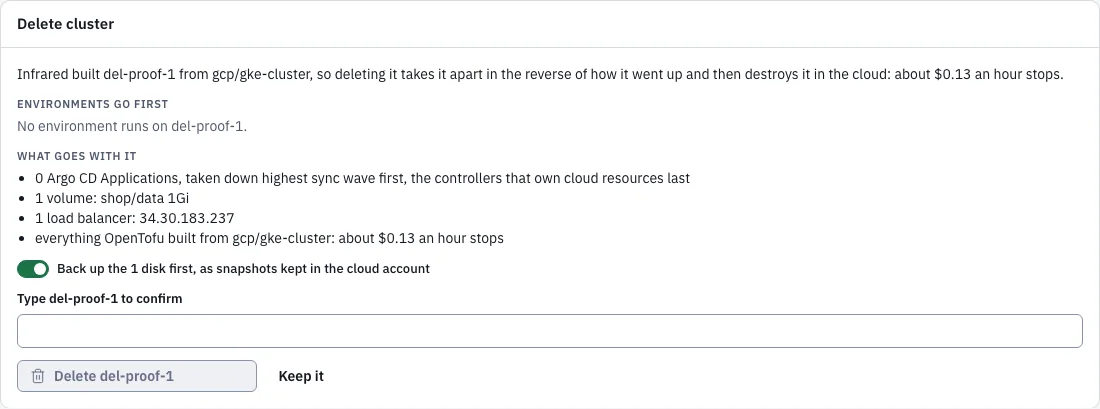
Type the cluster's name and choose Delete edge-us-east-1. Through the API:
curl -X DELETE "https://<host>/api/v1/clusters/edge-us-east-1?confirm=edge-us-east-1&backup=true" \
  -H "Authorization: Bearer $INFRARED_TOKEN"
confirm is the cluster's name again, and backup=false skips the backup. Infrared then runs the deletion step by step, shown under Deleting edge-us-east-1 on the cluster's page and as Deleting with the step on Clusters. If the management cluster restarts, the deletion picks up where it was.
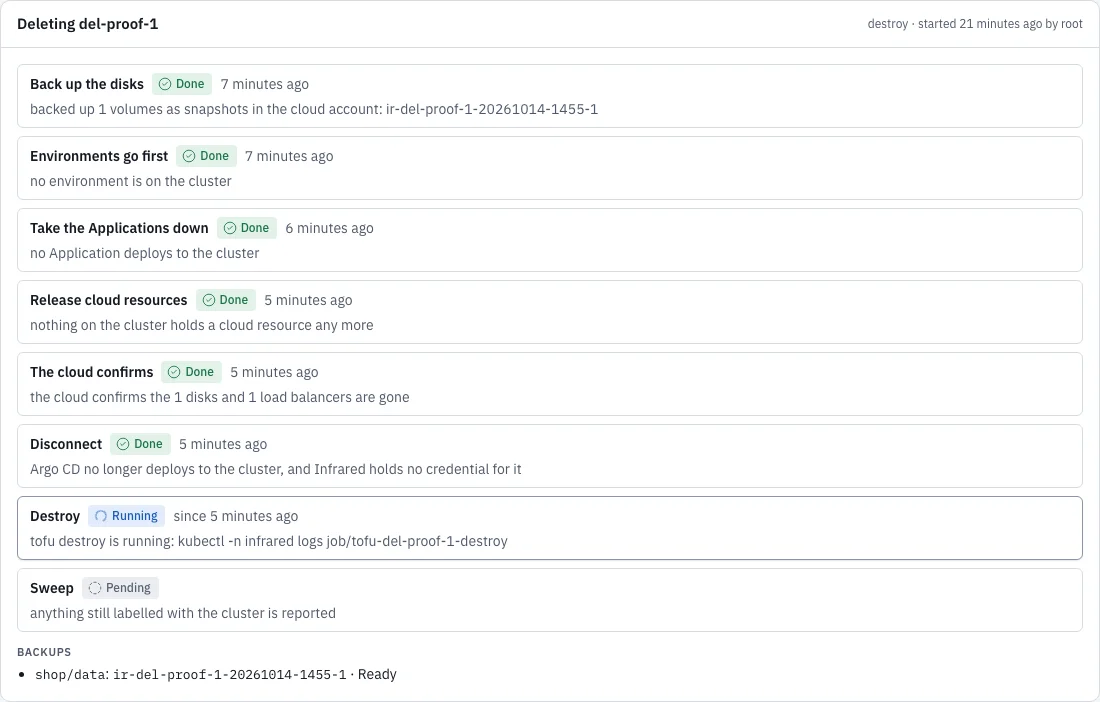
| Step | What happens |
|---|---|
| Back up the disks | A snapshot of each disk the cluster's volumes are on, through its cloud account. The deletion waits until every snapshot is ready. |
| Environments go first | The deletion waits, marked Waiting on you, until no environment is placed on the cluster. Each one is listed with Move… and Remove…. Nothing is taken down before. |
| Take the Applications down | Infrared takes the cluster's app-of-apps out of the gitops repo without deleting what it manages, then deletes the Applications on the cluster, highest sync wave first, and the controllers that own cloud resources (a load balancer controller, external-dns, CSI drivers) last, so they can delete what they made. |
| Release cloud resources | For a cluster Infrared built: the namespaces outside the cluster's own system, and the load balancers and volume claims in default, are deleted while the cluster's controllers still run. |
| The cloud confirms | Infrared asks the cloud until the disks and load balancers the cluster held are gone. |
| Disconnect | Argo CD forgets the cluster, and Infrared drops the kubeconfig and credentials it holds for it. |
| Destroy | OpenTofu destroys what the template built, through the cloud account. |
| Sweep | Infrared asks the cloud for anything still labelled with the cluster and lists it under What may be left behind. It deletes nothing it finds. |
A cluster Infrared only registered, by kubeconfig or from someone else's OpenTofu, is disconnected, never destroyed. Its environments still go first and Infrared takes down the Applications it deployed there, but the cluster keeps running with its disks and load balancers. Delete the ServiceAccount whose token Infrared used on it.
A stuck step
A step that runs for more than 15 minutes is Stuck, and one the cloud refused is Failed. Force this step on… and the cluster's name move it on, and record under What may be left behind what it may leave, with each resource's cloud ID, so you can delete it in the cloud's console. Force never skips the environments. On a failed destroy it becomes Run the destroy again…: fix what the destroy's log names first. Through the API:
curl -X POST https://<host>/api/v1/clusters/edge-us-east-1/deletion/force \
  -H "Authorization: Bearer $INFRARED_TOKEN" -H "Content-Type: application/json" \
  -d '{"confirm": "edge-us-east-1"}'
The backups stay in the cloud account after the cluster is gone: on Google Cloud as disk snapshots named ir-<cluster>-<time>-<n>, on AWS as EBS snapshots tagged infrared-cluster=<cluster>. Restore one by creating a disk from it.
Not yet
- Addresses for environments on workload clusters.
- Mapping org access groups to Kubernetes RBAC on workload clusters.
- A cluster template and cloud account for Linode.
See the roadmap.