Ask for a change
Asking for a change takes one line. Infrared opens the issue for you and starts its Change: the architect turns your line into acceptance criteria and a plan, agents build and review the work, and you make the two decisions that matter, whether to build it and whether to ship it. You follow it all on one page; see Changes.
This page walks through the default change-quick AgentWorkflow, which carries one issue from the moment it is opened to production. The larger change AgentWorkflow reviews pull requests people open themselves.
Before you start
- A Product whose repo the agents will change. See Products.
- A model provider key. Agent steps call Claude with your org's Anthropic API key, and the runs are billed to it. An org admin sets it under Settings → Model provider. Infrared checks the key with Anthropic before saving it, never shows it again, and keeps watch on its health. If the key runs out of credit or is rejected, every page says that agent runs are stopped, with a link to fix it. See Settings.
- The org's GitHub App on the repo, which every org has from setup. Each agent step gets a short-lived token from it to push its branch, open the pull request and update the issue.
Ask for a change
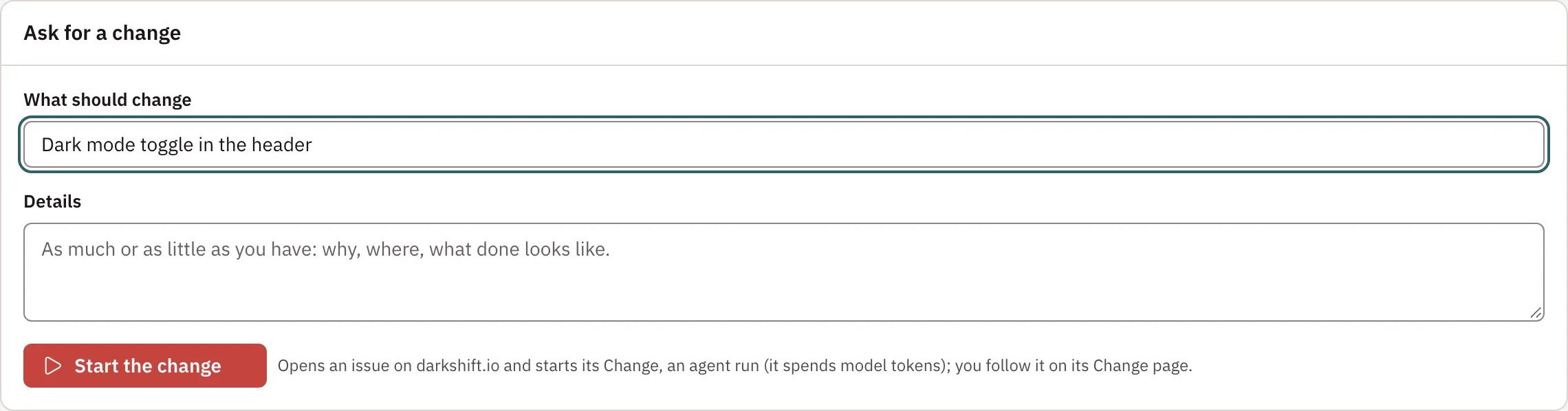
- Open the Product and its Changes tab, and choose Ask for a change.
- Under What should change, say what you want in a line, for example Show the build commit on /version.
- Add Details if you have them: why, where, what done looks like. As much or as little as you have; the architect fills in the rest.
- Choose Start the change.
Infrared opens the issue on the Product's first repo as your org's App, with a footer saying who asked in Infrared, starts its Change, and takes you to the Change's page. Back to <product> at the top of that page returns you to the Changes tab, where your request now shows under In progress.
If the issue opens but no AgentWorkflow takes it (for example, the org has turned change-quick off), the form says <issue> is open, but no Change started, with why and a link to the issue.
On the Product that delivers Infrared itself, a Change ends when its pull request merges: the next platform release ships it.
Other ways a Change starts
You don't have to start from Infrared. A Change also starts when:
- someone opens an issue on one of the Product's repos on GitHub;
- someone labels an issue
infrared:todo-agentorneeds-hydrationon GitHub, and the issue has no Change running.
Both need the org's App webhook to be active (see Triggers and scheduling). An issue that is already in Todo: agent skips hydration and triage and goes straight to the builder.
To start a Change for an issue that already exists, from a terminal:
ir run start --workflow change-quick --product zippy --issue 12 # or --issue <repo>#12
Or through the API:
curl -X POST https://<host>/api/v1/orgs/<org>/agentworkflowruns \
  -H "Authorization: Bearer $INFRARED_TOKEN" -H 'Content-Type: application/json' \
  -d '{"workflow": "change-quick", "product": "zippy", "issue": "12"}'
Every agent step spends model tokens, so starting a Change spends credit.
What happens, step by step
A change-quick Change runs these steps in order. The ones marked for you are where it waits.
| Step | What happens | It ends with |
|---|---|---|
Issue hydration (hydrate) | The architect reads the repo and adds acceptance criteria, design notes, a verification plan and an estimate to the issue. See Hydration. | HYDRATED, DUPLICATE or BLOCKED |
Triage (triage), for you | You choose Build it or Hand to a person. See Triage. | Approved, or HANDED TO A PERSON, which ends the Change |
Feature builder (product-feature-builder) | Implements the issue with tests on the branch infrared/<run>, runs the build and tests, and opens a pull request linked to the issue. | CHANGED, NO CHANGE NEEDED or BLOCKED |
QA engineer (qa) | Infrared waits for CI on the pull request; green CI ends the step without an agent. On a failure, the QA engineer reads the failed checks: a wrong test it fixes on the branch, wrong code it sends back to the builder with its finding. | TEST CHANGED, CODE CHANGE NEEDED, NO CHANGE NEEDED or BLOCKED |
| Quality reviewer | Reviews correctness and test quality, and fixes small things itself. | VERIFIED, MERGE WITH FOLLOW-UPS, CODE CHANGE NEEDED or BLOCK |
| Security reviewer | Looks for malicious edits, secrets and known vulnerabilities, and fixes what is small and unambiguous. A BLOCK stops the Change. | VERIFIED, MERGE WITH FOLLOW-UPS, CODE CHANGE NEEDED or BLOCK |
Human approval (human-approval), for you | You read the verdicts, the evidence and the diff, then Approve or Reject. See Approval. | Your approval or rejection |
| Resolve conflicts | Runs only when the pull request no longer merges cleanly because another Change merged first. The merge conflict resolver reapplies the Change on the current base, keeping both sides, and runs the tests. | CHANGED, NO CHANGE NEEDED or BLOCKED |
| Merge | Squash-merges the pull request once every required step passed. If the base moved at the last moment, it goes back to Resolve conflicts, up to three times. | MERGED |
| Promote to pre-production | Waits for the merge commit's build, tags the repo and the image vX.Y.Z, and deploys it to the Product's first pre-production environment. Skipped for a Product without environments. | PROMOTED and the deployment |
| Promote to production, for you | Waits for you to approve the same deployment for production on the deployment's page, then deploys it there. | PROMOTED |
When the QA engineer or a reviewer sends work back with CODE CHANGE NEEDED, the builder fixes it on the same branch and every step from the builder runs again. That happens at most twice per step; after that, a person decides. On a brand-new app, a reviewer's finding that is still open after those rounds becomes an issue labelled infrared:blocks-release instead, and the Change goes on: you see your app in pre-production while production waits for the fix.
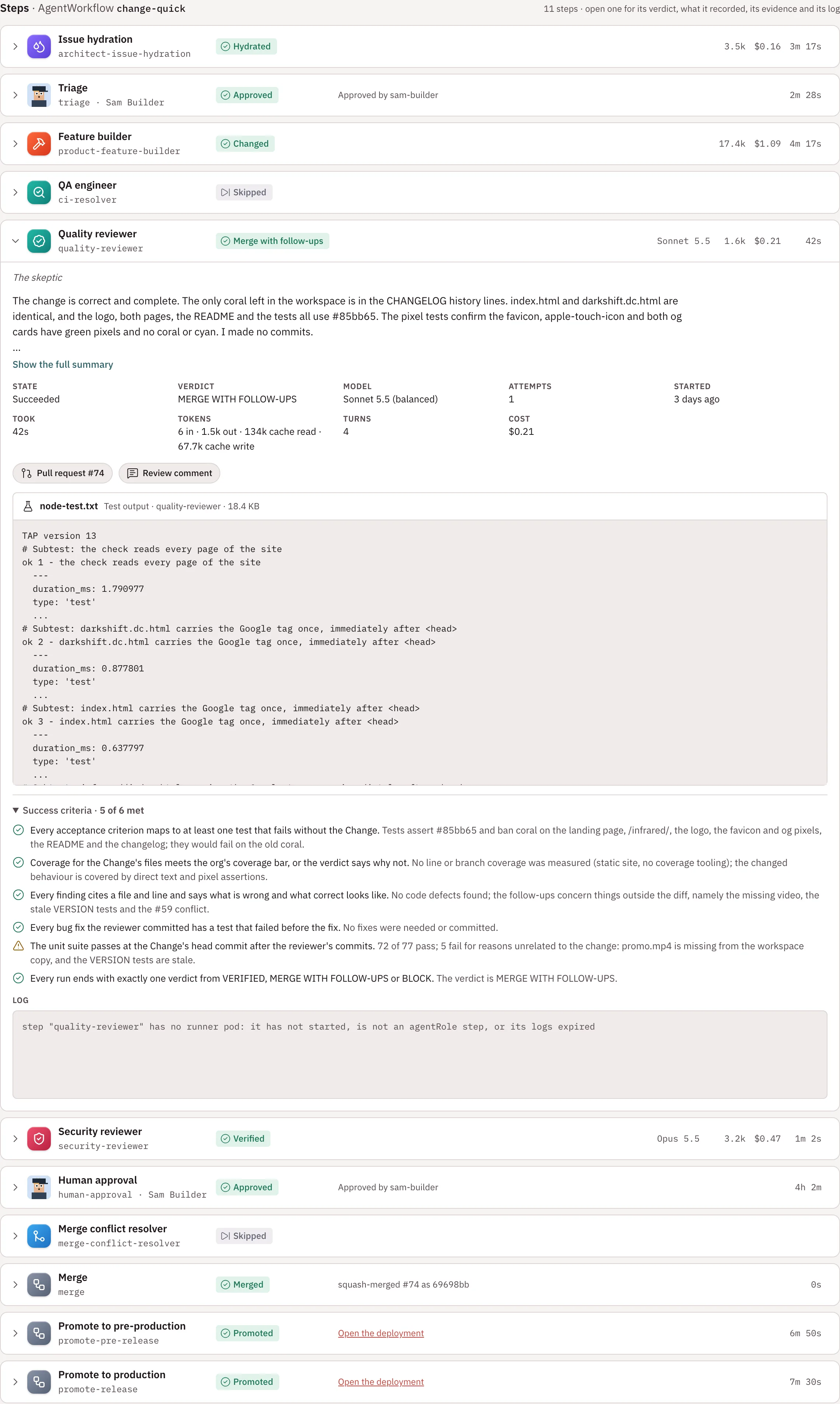
Watch it happen live on the Change's page:
Each agent step runs as a Kubernetes Job in the org's namespace, with its AgentRole's mission, responsibilities, guardrails, opinions and success criteria as instructions, and its model and budget limits. The runner owns git: agents edit files and run commands, and the runner commits their work and opens the pull request. Jobs and their logs are kept for a day after a step finishes.
kubectl -n ir-org-<org> get agentworkflowruns
kubectl -n ir-org-<org> get jobs,pods -l infrared.darkshift.io/run=<run>
Turn human approvals off
Each Product has one switch for all of its human gates: Human approvals in the Product's settings (Product settings on its page), People approve Changes and deployments. It is on by default, and only org admins change it.
With it off:
- Triage builds every hydrated issue, as if someone chose Build it.
- Human approval passes as soon as the reviewers do, and the pull request merges.
- Promotion to production happens as soon as pre-production runs the new version Healthy.
Each of these steps records "Approved automatically: human approvals are off for <product>", and each environment records Infrared (human approvals off) as its approver. The Product's page says Human approvals off under its name.
Some things still stop for a person with approvals off: a reviewer's BLOCK, a failed step, and a step that stops to ask for help. Turning approvals off asks you to confirm, because production then takes deployments without anyone looking, Changes and deployments already waiting go ahead at once, and every issue agents build spends model credit. Turning approvals back on takes effect immediately: the next gate waits again.
The switch is the Product's spec.humanApprovals (left out, or true, means on):
kubectl -n ir-org-<org> patch product <product> --type merge -p '{"spec":{"humanApprovals":false}}'
When a step needs a human
When a step can't finish, the Change stops at it and waits for you, with the reason on the step and in the banner. On Changes, the request shows Needs your guidance and the count in the navigation goes up. What to do depends on the cause:
- An agent that needs a decision asks for it in a needs your input panel. Answer and choose Retry with this guidance. See When an agent stops and asks.
- One of Infrared's own steps (the merge or a promotion) shows Stopped at
<step>. See When one of Infrared's own steps stops. - Anything else: fix the cause, then Retry the step (or Retry without guidance). With
ir,ir run retry <run> --step <step>.
The messages you are most likely to see:
| Message | Likely cause | What to do |
|---|---|---|
secret "model-provider-anthropic" not found | The org has no model provider key | Set it under Settings → Model provider, then retry the step |
agent failed: Credit balance is too low | The org's Anthropic key is out of credit. Every page shows Agent runs are stopped | Add credit to the key's Anthropic workspace, or set a funded key, choose Check now to confirm, then retry |
agent failed: … invalid x-api-key | Anthropic rejects the key: it was revoked or deleted | Set a working key under Settings → Model provider, then retry |
| The runner exited without a verdict | The runner couldn't start, or ran out of memory or time | Read the step's log, fix the cause, retry |
BLOCK from the security reviewer | The reviewer found something it won't let through | Read its summary and evidence, then fix the branch or reject the Change |