Set up announcements
Announcements are drafts that agents write so you can tell people what you shipped. They land in a Slack channel you choose. Infrared never posts, publishes or sends them: you read the drafts and post what you like by hand.
There are two kinds:
| What | When | Written by |
|---|---|---|
| A blog post, a newsletter item, and one post per account below | Each time a Release cuts its tag | The Release AgentWorkflow: blogger, newsletter and socializer |
| The week's newsletter | Thursdays at 14:00 in the org's time zone | The GTM weekly AgentWorkflow: newsletter |
Setting it up takes three steps, all in Settings → Announcements (org admins). The panel opens with a checklist that ticks off each step as it's done: the accounts (optional), the Slack channel, and what's writing drafts (for each Release, every week, or both).
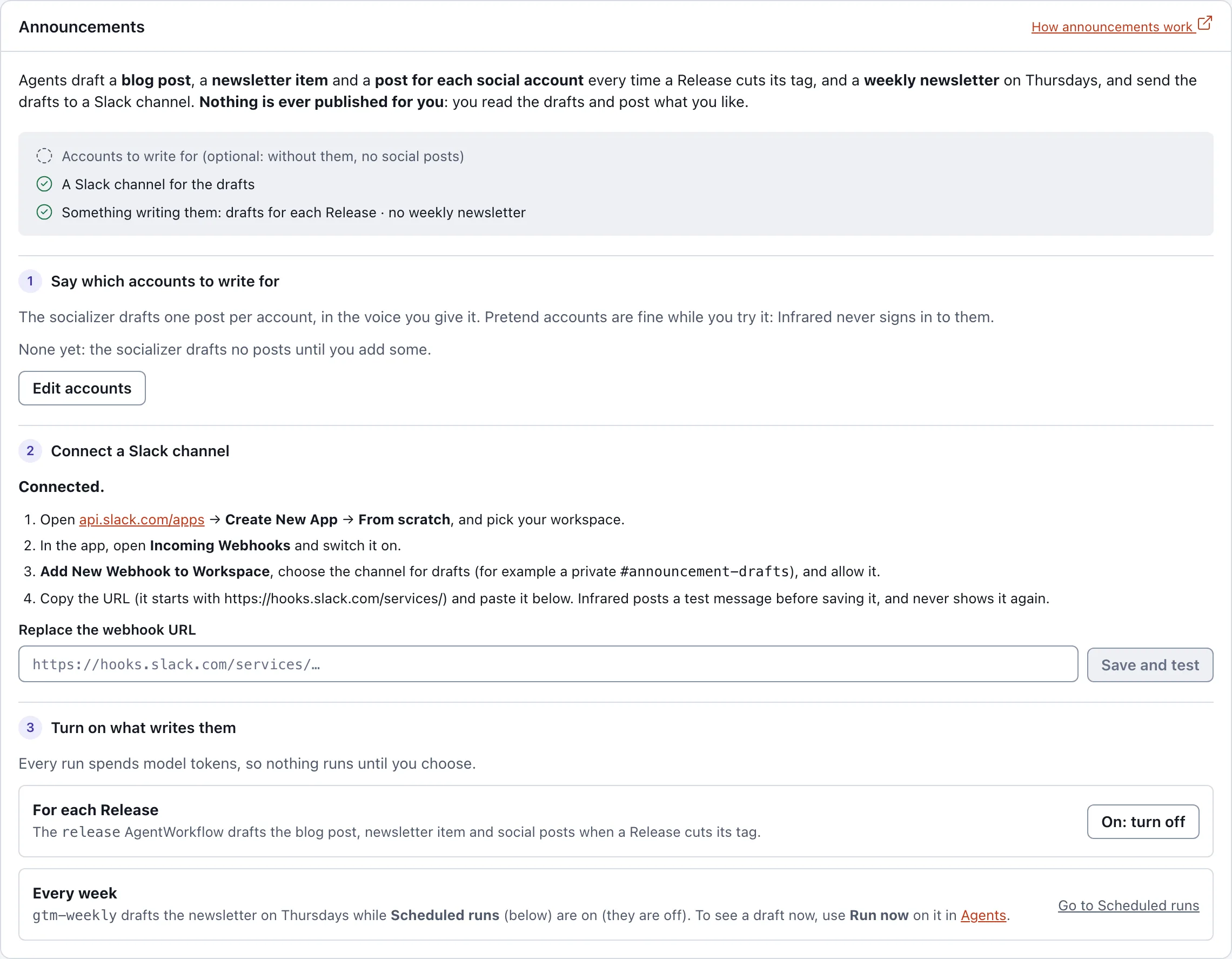
1. Say which accounts to write for
Choose Edit accounts, then Add account for each social account the socializer should draft posts for: the network (x, linkedin, bluesky, mastodon or threads), the Handle, and optionally a Voice such as "plain and technical" or "warm, no hype". Choose Save accounts. Up to 20 accounts; each needs a handle.
The accounts can be pretend ones while you get a feel for the drafts: Infrared never signs in to them. Without accounts the socializer writes no posts; the blog post and newsletter are still drafted.
2. Connect a Slack channel
Infrared posts drafts with a Slack Incoming Webhook, a URL that can post to one channel and do nothing else.
- Open api.slack.com/apps and choose Create New App → From scratch. Name it (for example "Infrared drafts") and pick your workspace.
- In the app, open Incoming Webhooks and switch Activate Incoming Webhooks on.
- Choose Add New Webhook to Workspace, pick the channel for drafts (a private
#announcement-draftsworks well) and Allow. - Copy the webhook URL. It starts with
https://hooks.slack.com/services/. - In Infrared, paste it into Webhook URL and choose Save and test.
Infrared posts a test message to the channel before it saves the URL, so you know it works; if Slack refuses it, nothing is saved. It stores the URL in the Secret notifications-slack (key webhook-url) in the org's namespace and never shows it again. Once a channel is connected the step says Connected. and the field becomes Replace the webhook URL.
Without a Slack channel, the drafts still exist: they are in each run's summary on its page under Changes.
3. Turn on what writes them
Both cost model tokens on every run, so neither runs until you turn it on:
- For each Release: choose Turn on next to For each Release (it then reads On: turn off). This enables the
releaseAgentWorkflow, the same as Enable in Agents → AgentWorkflows. The next Release that cuts its tag starts a run. - Every week:
gtm-weeklyships enabled but runs only while the org's scheduled runs are on. Go to Scheduled runs jumps to that panel further down Settings; choose Turn scheduled runs on there. Scheduled runs also start the catalog's daily audit. To see a draft right away, choose Run now ongtm-weeklyin Agents → AgentWorkflows.
What you get
Each draft arrives as one Slack message: its title in bold, the draft, and a footer naming the AgentRole, the Product and the run that wrote it, ending "Nothing was published." A draft too long for one message is cut and marked as cut; the full text is with the run. If no Slack channel is set when the run gets there, the run's step says the draft was not delivered and keeps it. Edit and post them wherever you publish. The run that wrote them is on Changes, with each step's full output, its cost and its logs.
API
| Call | What it does |
|---|---|
GET /v1/orgs/{org}/announcements | The accounts, and whether a Slack channel is set |
PUT /v1/orgs/{org}/announcements/accounts | Replace the accounts: {"accounts": [{"network": "x", "handle": "@zippy", "voice": "plain"}]} |
PUT /v1/orgs/{org}/announcements/slack | Set the webhook: {"webhookURL": "https://hooks.slack.com/services/…"}; Infrared posts a test message first and answers 422 if it fails |
PATCH /v1/orgs/{org}/agentworkflows/release/enabled | {"enabled": true} to draft for each Release |