Break glass
The root user is the install's first platform admin, made by the setup wizard. It isn't a person. It's a break-glass account that signs in with an email and a password kept only in your vault, such as a vault in your password manager, and it works when Google can't sign anyone in. Infrared keeps only a one-way bcrypt hash of the password, never the password itself, and records every use, so you always know whether someone broke the glass.
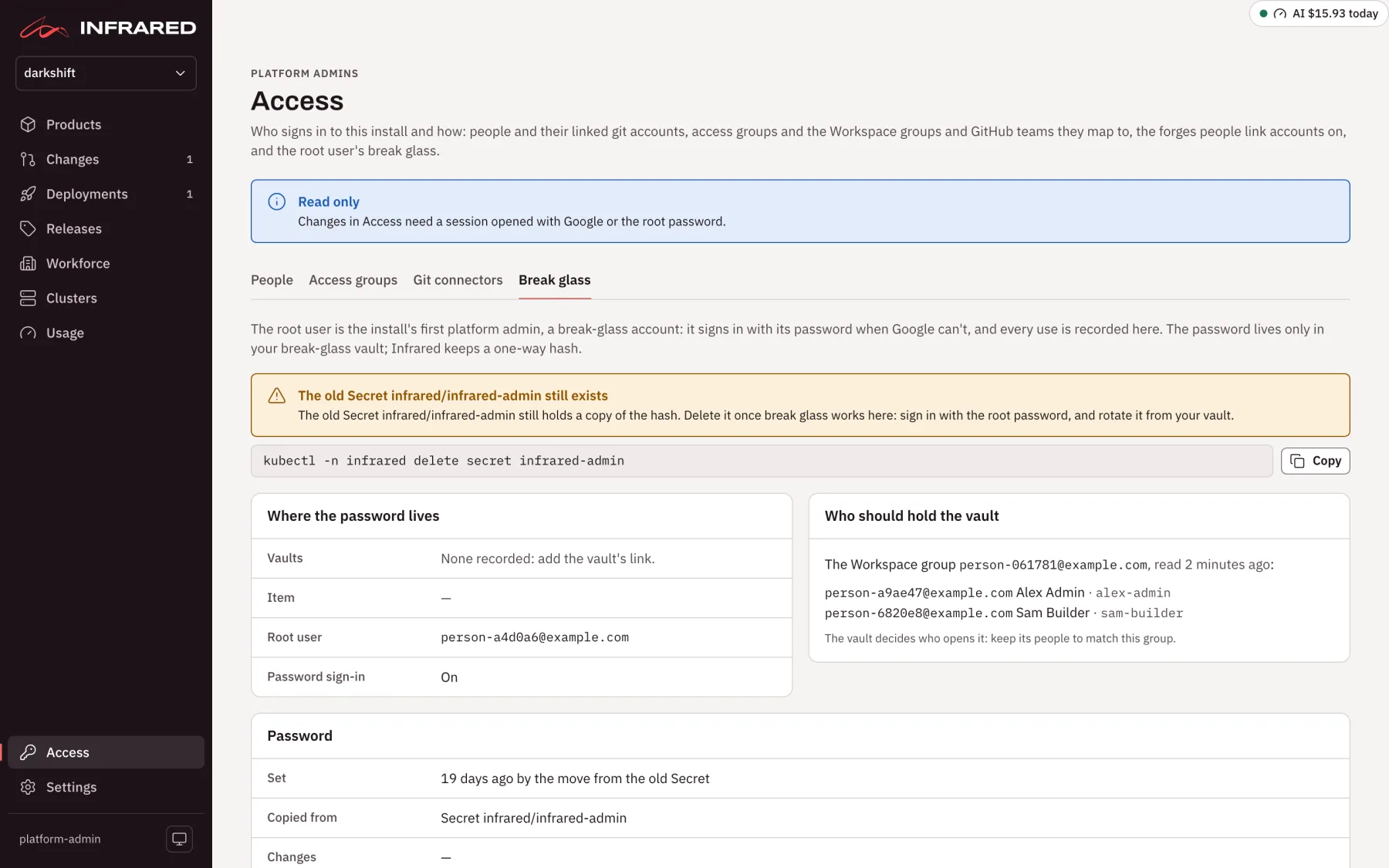
Day to day, people sign in with Google, and the root user's form waits under Other ways to sign in. Access → Break glass is where you keep it ready: where the password lives, who should hold the vault, when the password was last set, and every use.
Where the password lives
Where the password lives shows the vault links, the vault item, the root user's address, and whether password sign-in is on. Edit opens:
- Root user's address: the address the root user signs in with. Changing it signs every other root session out, and moves the root user's API tokens to the new address.
- Vault links: up to 5 vaults, each a Vault name people know it by and a Link that opens it. Links only, never a secret.
- Vault item: the item's name in the vault.
- Holders group: the Workspace group of the people who should be able to open the vault, in an allowed Google domain.
Choose Save where the password lives. Who should hold the vault then lists the group's people as Infrared last read them, each with their linked GitHub login, and flags anyone Google Workspace reports suspended. The vault decides who can open it, so keep its people matching the group.
The root user's record is the cluster-scoped BreakGlass named root, which only the API writes. It holds the hash, the address, the vault links, the holders group, and the password's history and uses. No Secret holds the password or its hash. kubectl get breakglass root shows the address, when the password was last set, and how many uses there have been. Backups carry the record, uses included.
Rotate the root password
Rotate it when someone who could open the vault leaves, after a use nobody expected, and after you break the glass.
- In your vault, generate a new password of 32 characters or more, and save it there first.
- In Access → Break glass, under Rotate the root password, paste it into New root password and Paste it again, then choose Rotate root password.
Infrared takes 20 to 72 characters, keeps only the new hash, and never shows the password back: both fields empty as soon as you send it. It refuses the password it already has: "That is the password Infrared already has: generate a new one in your vault." Every root session opened before the rotation is signed out, apart from your own if you rotate as the root user. Password then shows when it was set and by whom, and lists its last 20 changes.
Rotating needs a platform admin's session opened with Google or the root password. It works even while password sign-in is off, so break glass can be ready before anyone needs it. Through the API, it's PUT /v1/access/break-glass/password from such a session.
Every use
Every use lists, newest first, each time the root user was used:
| How | What it was |
|---|---|
| Signed in with the password | A sign-in with the root password, on the sign-in page or with ir login --email. |
| Opened a sign-in link | A browser signed in as the root user through a link made with one of its API tokens (Open Infrared from ir). |
| Minted an API token | An API token minted from a root session, such as the one ir setup run saves. |
Each use shows when, the caller's address, the address Infrared was opened at, the browser, and a detail such as the token's name. The panel keeps the last 100 uses and counts all of them. It also counts refused password sign-ins, with the time of the last one. A use nobody expected means someone else has the password: rotate it.
The root user's API tokens lists the root user's tokens, each with Revoke. Each acts as the root user, a platform admin.
Sign in when Google can't
-
Take the password from your vault.
-
On the sign-in page, choose Other ways to sign in, and sign in under Root user with its email and the password.
From a terminal, put the password in a file only you can read and run:
ir login --server https://<host>/api --email <root user's address> --password-file <file>irsigns in once, mints an API token for that machine, and Infrared records the use. Delete the file afterwards. -
Once Google works again, rotate the password if more people saw it than should have.
If ir already holds one of the root user's API tokens, ir open signs a browser in as the root user with no password at all.
The root user's API tokens and the chart's tokens never depend on Google, and neither does Sign in with GitHub. A Google user's token loses the roles their Workspace groups give once Infrared hasn't read the groups for 10 minutes.
Turn password sign-in off
Once Sign in with Google works, you can turn the root user's email and password off for the whole install, so people sign in only with Google, or with GitHub if they're on an access group. The switch is the chart value signIn.password.enabled. It belongs to the install's configuration, not to a setting in the UI, so nobody it shuts out can turn it back on from Infrared.
Set it in your gitops repo, in Infrared's values file registry/clusters/<cluster>/values/infrared.yaml, through a pull request:
signIn:
  password:
    enabled: false
Argo CD rolls the API with the new value (Values the adopted Application carries). A value you passed to helm install isn't carried once Argo CD adopts Infrared, so set it in the file.
The value never locks everyone out. false takes effect only once a Google sign-in has worked on the install with its configured client. Infrared records that first sign-in in the ConfigMap infrared-sign-in in its namespace. Until then the password keeps working, and the Sign-in panel in Settings says why under Password. A new client ID turns password sign-in back on until someone signs in through it, and so does turning Sign in with Google off.
Once password sign-in is off:
- the sign-in page has no root user form, and
POST /v1/auth/loginanswers 403; - an open root session is signed out at its next request, and a sign-in link made with a root token lands on the sign-in page: "The root user can't sign in on this install: password sign-in is off.";
ir login --emailstops working, so use an API token;- the root user's API tokens keep working. Revoke them in Access → Break glass if you want none;
- rotating the root password and editing where it lives still work, so break glass stays ready. Access → Break glass says "Password sign-in is off on this install".
When Google breaks after password sign-in is off
Anyone with access to the management cluster turns the password back on by deleting the record of the first Google sign-in:
kubectl --context <cluster> -n infrared delete configmap infrared-sign-in
Within 15 seconds the sign-in page shows the root user's form again. The password works until the next Google sign-in, which records it again and turns password sign-in off again. When Google refuses the install's client at a sign-in, for example after its secret was deleted, Infrared deletes the ConfigMap itself.
Backups leave the ConfigMap out, so an install restored from a backup has password sign-in on until a Google sign-in works there. To turn password sign-in back on for good, set signIn.password.enabled: true in the values file, or remove the lines.