Access groups
An access group gives one role in one org to a set of people. It grants that role and nothing else. Most of the time you map it to a Google Workspace group you already keep, so the people you add to the group in Google Workspace can work in Infrared, and the people you take out lose access within minutes.
An access group says who holds its role in up to three ways, and keeps one GitHub team in step:
| Field | Who holds the role |
|---|---|
| Workspace group | The people of a Google Workspace group, by its address, such as [email protected], when they sign in with Google. |
| People by email | Each person whose Google account has that address, when they sign in with Google. Adding an address is how you invite one person. |
| GitHub logins | People who sign in with GitHub with that login. On an access group with no Workspace group, also people who sign in with Google and linked that login. |
| GitHub team | Not a way in: the GitHub team, by its slug, that Infrared keeps in step with the access group's people. See GitHub teams. |
The roles are platform-admin, org-admin, member and viewer (Roles). platform-admin is offered only on the platform org.
Manage an org's access groups
An org's admins manage its access groups in Workforce → Access groups. The page lists each access group with its role, its Workspace group and how many people it holds, its GitHub team and when it last synced, its GitHub logins, its people by email and its description.
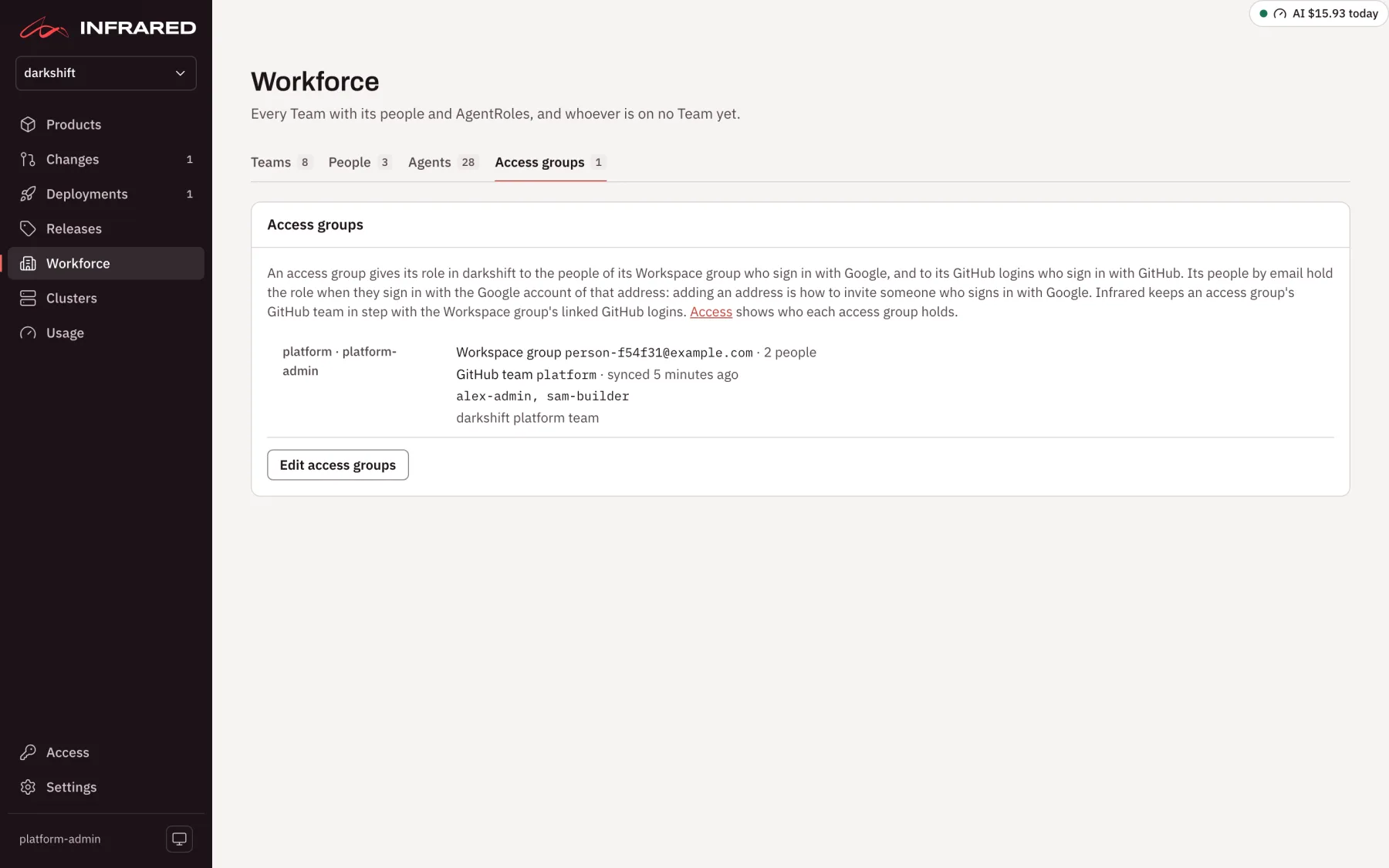
- Choose Edit access groups.
- For each access group, fill in the Access group name, the Role, and any of Workspace group, GitHub team, GitHub logins, People by email and Description. Separate logins and addresses with commas or spaces. Add access group adds one, starting as
member; Remove drops one. - Choose Save access groups, or Cancel to leave the list as it was.
Saving replaces the org's whole list and needs org-admin. Adding, removing or changing a platform-admin access group needs a platform admin. With no access groups, the page says "No access groups yet: only platform admins have a role in <org>."
Before it saves, Infrared checks that:
- each Workspace group is in an allowed Google domain (Allowed domains), and, once Infrared reads Workspace groups, that the group exists and Infrared may read it. A group that holds everyone in the domain is refused, and so is one whose groups nest more than 5 levels deep: map a group of named people instead;
- each GitHub team is a slug of lowercase letters, digits and single hyphens, the org has a GitHub App, and no other access group of the org names the same team;
- you don't take platform admin from yourself. A change that would leave you without it is refused with "That would take platform admin from you". The root user is never cut off: the root password signs in whatever the access groups say.
The same list is spec.accessGroups on the Organization:
apiVersion: infrared.darkshift.io/v1alpha1
kind: Organization
metadata:
name: acme
spec:
displayName: Acme
accessGroups:
- name: platform
role: org-admin
githubTeam: platform
description: Owns the org's Products and AgentRoles
- name: checkout
role: member
githubTeam: checkout
- name: auditors
role: viewer
members: [octocat]
Through the API, PUT /v1/orgs/{org}/access-groups replaces the whole list:
curl -X PUT https://<host>/api/v1/orgs/<org>/access-groups \
  -H "Authorization: Bearer $INFRARED_TOKEN" -H 'Content-Type: application/json' \
  -d '{"accessGroups": [{"name": "checkout", "role": "member", "googleGroup": "[email protected]", "githubTeam": "checkout"}]}'
Access group names are lowercase DNS labels. GitHub logins and addresses match without regard to case.
An org on a capped plan, such as one made at sign-up, may name only so many people. Its admins can still take people off and change roles past the limit; adding someone is refused, and the page says why.
Map an access group from Access
A platform admin can map any org's access group from Access → Access groups. Map opens one access group's Workspace group, GitHub team and People by email, and Save mapping changes only those. The org's other access groups, and this one's GitHub logins and description, stay as they are.
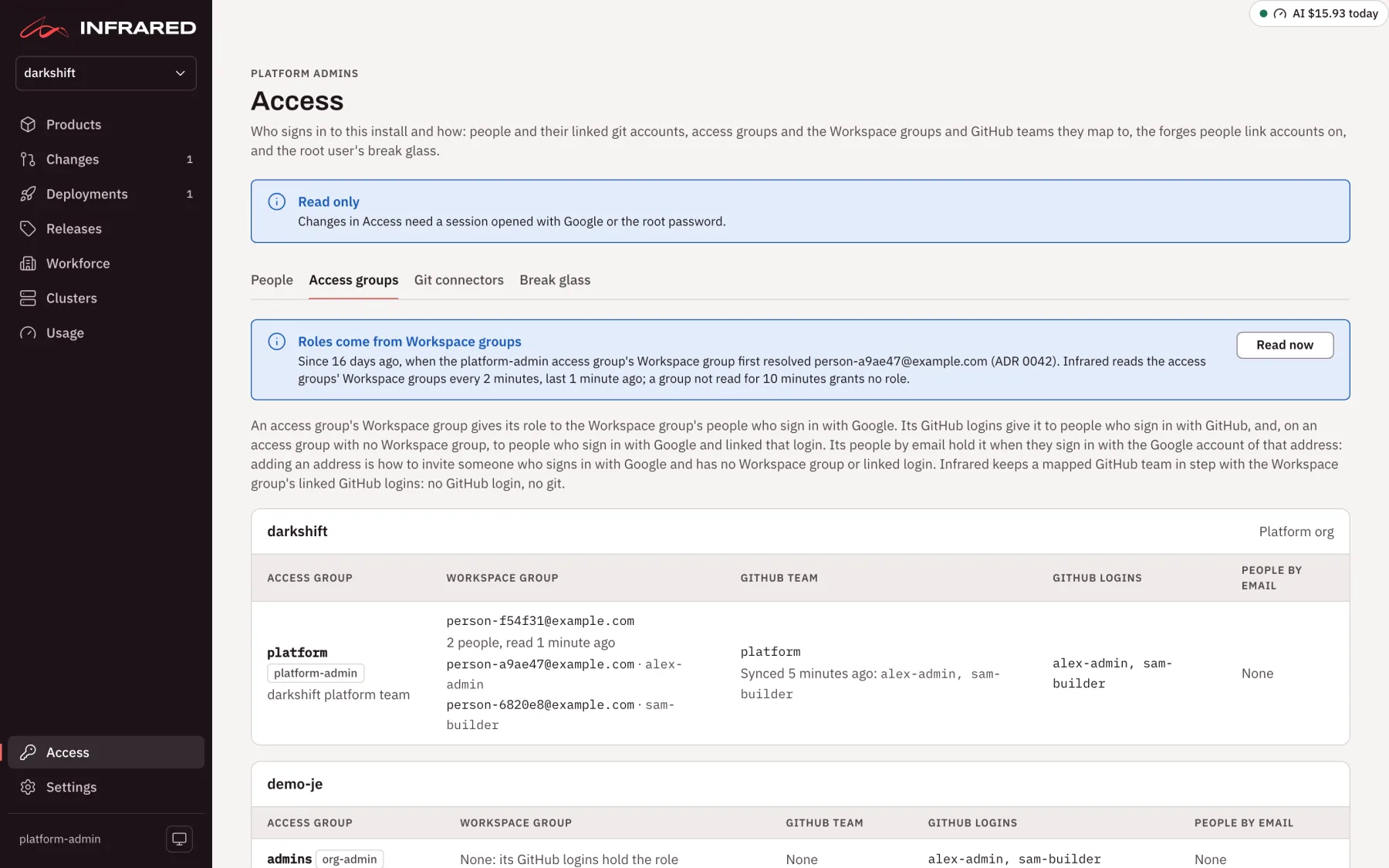
Invite someone by email
To give one person a role without a Workspace group, add their Google account's address to an access group's People by email, in Workforce → Access groups or with Map in Access. They hold the role from their next sign-in with Google. Taking the address off ends the role at their next request.
The address must be one that can sign in: in an allowed domain, or any address when the install lets anyone sign up. A person who changes their Google address needs the new one added.
Read Workspace groups
For a Workspace group to give its role, Infrared reads the group's members from Google Workspace's directory. It does so as a Google service account it impersonates, with no key. Someone with admin rights in your Google Cloud organization, and a super admin of your Google Workspace, set this up once:
-
Make a service account. In a Google Cloud project of your organization, create a service account for Infrared, such as
infrared-directory@<project>.iam.gserviceaccount.com. Give it no role in the project, and no key. -
Let Infrared's API act as it. On GKE, the API's identity is the Workload Identity of its Kubernetes ServiceAccount,
infrared-apiin Infrared's namespace. Grant that principalroles/iam.workloadIdentityUseron the service account:gcloud iam service-accounts add-iam-policy-binding infrared-directory@<project>.iam.gserviceaccount.com \--role roles/iam.workloadIdentityUser \--member "principal://iam.googleapis.com/projects/<cluster project number>/locations/global/workloadIdentityPools/<cluster project>.svc.id.goog/subject/ns/infrared/sa/infrared-api"Don't annotate the Kubernetes ServiceAccount with the service account. The API impersonates it only to read groups, and keeps its own identity for everything else.
-
Turn on the APIs in the service account's project, if they aren't on yet: the Admin SDK API (
admin.googleapis.com), which reads the groups, and the IAM Service Account Credentials API (iamcredentials.googleapis.com), which impersonation uses. Neither costs anything. -
Let it read groups. A super admin opens the Google Admin console, then Account → Admin roles → Groups Reader → Admins → Assign service accounts, and adds the service account's address. Groups Reader is enough; don't assign Groups Admin.
-
Tell Infrared. In your gitops repo, set the chart value in Infrared's values file,
registry/clusters/<cluster>/values/infrared.yaml, through a pull request:api:directory:serviceAccount: infrared-directory@<project>.iam.gserviceaccount.comArgo CD rolls the API with the new value. Until it's set, no Workspace group gives a role, and Access says "No Workspace directory is configured".
-
Check. Open Access → People. It says how often Infrared reads the groups and when it last did, and lists any group it couldn't read with the reason, such as a missing Groups Reader role. Map an access group's Workspace group, then choose Read now.
| Chart value | Default | What it does |
|---|---|---|
api.directory.serviceAccount | empty | The service account the API impersonates. Empty, Infrared reads no group and no group gives a role. |
api.directory.api | admin | admin, the Admin SDK Directory API, which also reports suspended people; or cloud-identity, the Cloud Identity API, which can't, so you take a suspended person out of every group yourself. |
api.directory.interval | 2m | How often Infrared reads the groups. A person taken out of a group loses its role within about this long. |
api.directory.maxAge | 10m | How long a group's last good read counts. Older, the group gives no role until it's read again. At least twice the interval. |
Who holds a Workspace group's role
- Infrared reads the group's members, and the members of groups inside it, up to 5 levels deep. Members from outside your Google Workspace, service accounts and shared drives hold no role.
- It reads every mapped group every 2 minutes, and at once when a mapping changes or someone chooses Read now.
- A person Google Workspace reports suspended holds nothing, in any access group.
- A group that hasn't been read for 10 minutes gives no role until it's read again: Infrared fails closed. The root user, the chart's tokens, GitHub logins on access groups without a Workspace group, and people by email keep working.
Access → Access groups shows each group's people, each with their linked GitHub login or "not linked", anyone reported suspended ("Suspended, holding nothing"), when the group was last read, and why a read failed.
Before Workspace groups give roles
On a new install, everyone who signs in with Google from an allowed domain is a platform admin, so the first people in can set things up. Access says so: "Every Google sign-in from an allowed domain is a platform admin". Until you change that, allow only domains whose every account should administer Infrared.
Roles come from Workspace groups once a platform-admin access group of the platform org has a Workspace group with at least one active person in it. Infrared records that moment once, on the Installation (spec.signIn.google.groupRoles), and Access then says "Roles come from Workspace groups". From then on, a person signed in with Google holds:
- the role of each access group whose Workspace group they're in;
- the role of each access group that lists their address under People by email;
- on an access group with no Workspace group, its role when its GitHub logins include the login they linked;
- nothing at all while Google Workspace reports them suspended.
Someone in none of these still signs in, sees no org, and reads on You: "No role in any org yet: a platform admin adds you to an access group's Workspace group."
So map the platform org's platform-admin access group first, to a group you're in. Infrared refuses a mapping that would take platform admin from the person saving it, and the root password always signs in, so a wrong mapping never locks you out.
Infrared never goes back by itself. To return to every Google sign-in being a platform admin, sign in as the root user, take the Workspace group off every platform-admin access group of the platform org, then remove the record:
kubectl --context <cluster> patch installation infrared --type json \
  -p '[{"op": "remove", "path": "/spec/signIn/google/groupRoles"}]'
GitHub teams
For an access group with a GitHub team, Infrared keeps that team in the org's GitHub organization in step with the access group's people. Your people get the right GitHub access without anyone adding them by hand.
- Who belongs. The linked GitHub logins of the Workspace group's people who aren't suspended, and the access group's own GitHub logins that nobody has linked. An access group with no Workspace group wants its GitHub logins, less those of people reported suspended.
- It creates the team when it's missing: closed, so the organization's members see it, with notifications off, and described "Kept by Infrared: team
<access group>of org<org>." - It adds every login it wants that is already a member of the GitHub organization. It never invites anyone: a login that isn't a member is skipped with "not a member of
<organization>: invite them on GitHub", or "invited to<organization>: waiting for them to accept". - It removes members it doesn't want from teams it made. A team that already existed without that description is adopted: Infrared adds to it but never removes anyone, and lists the others as "kept: added on GitHub, not by Infrared".
- It never removes anyone from the GitHub organization.
- It runs within seconds of a change to the org's access groups or to a person's links or groups, and every 10 minutes.
A person Infrared hasn't read in the last 10 minutes is neither added nor removed. If their login is on the team already, it's listed as "kept: the Workspace directory has not been read for this person in the last 10 minutes".
Access → Access groups shows each team's members after its last sync, the logins it skipped and why, and the group's people who aren't on it because they haven't linked a GitHub login. Those people hold the role in Infrared but get nothing on GitHub, and You tells them: "Link your GitHub account to join <GitHub team> on GitHub".
The org's GitHub App needs the organization permission Members, read and write, to change teams. Apps the setup wizard or an org makes ask for it. For an older App, an owner of the GitHub organization adds it: open the organization's Settings → Developer settings → GitHub Apps, choose the App, set Permissions & events → Organization permissions → Members to Read and write, and choose Save changes. GitHub then asks the organization to accept the new permission. Until someone does, each of the org's teams says "The App <app> lacks Organization members (read and write): accept the new permission on the <organization> installation."
People
Access → People lists everyone who has signed in with Google, and everyone in a mapped Workspace group who hasn't yet.
| Column | What it shows |
|---|---|
| Person | Their name and address. |
| Status | Active; Suspended, when Google Workspace reports it, and they hold nothing; or Has not signed in, for someone in a mapped group. |
| Roles | Their role in each org, and where it comes from: a Workspace group, an address, a GitHub login, or an allowed domain while every Google sign-in is a platform admin. |
| Linked accounts | Each as its forge and login, such as GitHub · octocat. |
| Last sign-in | Their last sign-in with Google. |
| API tokens | The tokens they minted. |
Manage opens one person: their address, status, Infrared user, the mapped groups they're in, last sign-in and roles, their linked accounts with Unlink, their API tokens with Revoke, and Remove.
Remove deletes their Infrared user and linked accounts, so their next sign-in starts fresh. It doesn't sign them out or revoke their tokens, because their roles come from their groups and addresses: to end their access, take them out of those.
When someone leaves
Suspend their account in Google Workspace. Google refuses their next sign-in, and once roles come from Workspace groups:
- within about 2 minutes they hold nothing, through any group. Their open sessions end at their next request, and their API tokens are refused with "the token's owner is suspended in Google Workspace";
- Infrared takes their linked GitHub login out of the GitHub teams it keeps.
Taking someone out of a group ends the roles it gives the same way, within about 2 minutes, without signing them out.
Then:
- Take their address off any access group's People by email.
- Revoke their API tokens: in Access → People, choose Manage, then Revoke on each.
- If they could open the break-glass vault, take them out of it and out of the holders group, and rotate the root password.
- Remove them from your GitHub organization on GitHub if they should go. Infrared never removes anyone from it.