Access
Access answers two questions for a platform admin: who can sign in to this install, and what can each person do once they're in. You set it up once, and from then on people get their roles from the Google Workspace groups you already keep. When someone joins a group they can work in Infrared within minutes, and when they leave the group their access ends just as fast. You don't have to keep a second list of people in step by hand.
Access sits in the rail after the spacer, just above Settings. Only platform admins see it.
How people get in
- People sign in with Google. Each org has access groups, and each access group gives one role. Map an access group to a Google Workspace group, and the group's people hold that role when they sign in.
- People link their git accounts. Each person links the GitHub, GitLab or Gitea accounts they work with. Infrared keeps the GitHub team an access group maps to in step with its people's linked GitHub logins.
- People without a Google Workspace account sign in with GitHub, if their login is on an access group. On an install that allows sign-up, anyone with a Google account can sign in and gets an org of their own.
- The root user is break glass. It signs in with an email and a password kept in your vault, for the day Google can't sign anyone in, and Infrared records every use.
Common tasks
| You want to | Go to |
|---|---|
| Turn on Sign in with Google | Sign-in |
| Choose which Google Workspace domains may sign in | Allowed domains |
| Let anyone with a Google account sign up | Sign-up |
| Give a team a role in an org | Access groups |
| Invite one person by their email address | People by email |
| Have roles follow your Google Workspace groups | Read Workspace groups |
| Keep a GitHub team in step with an access group | GitHub teams |
| Take away someone's access when they leave | When someone leaves |
| Let people link GitLab, Gitea or GitHub accounts | Git connectors |
| Keep the root password ready, or rotate it | Break glass |
Give ir, CI or an MCP client a token | API tokens |
| Add another org | Organizations |
Roles
Every role is held in an org, through an access group of that org.
| Role | What it lets you do | Where it can be held |
|---|---|---|
platform-admin | Everything in every org, and what belongs to the install itself: clusters and each org's cluster allowlist, creating and deleting orgs, the GitHub App's webhook secret, and who signs in and how, in Access and the Sign-in panel of Settings. | Access groups of the platform org only. |
org-admin | Everything a member can do, and how the org works: create, edit and delete Products; create repos; edit, enable and reset AgentRoles and AgentWorkflows; edit the org's access groups; set the model provider key; add and remove domains; set up Slack; turn scheduled runs on or off. | Any org. |
member | The day-to-day work: start AgentWorkflowRuns, approve and reject steps, start deployments, approve promotions and end a hold with Go now, open and move issues, open and resolve incidents. | Any org. |
viewer | Read everything in the org and change nothing. | Any org. |
A person in several access groups holds the strongest of their roles. A person with platform-admin holds it in every org, not only the platform org. Platform admins see every org in the org switcher; everyone else sees the orgs they have a role in.
The platform admins are:
- the root user, and the API tokens it mints;
- the people of a
platform-adminaccess group of the platform org; - API tokens that come with the chart and have no owner, such as
mcp; - on a new install, everyone who signs in with Google from an allowed domain, until roles come from Workspace groups (Before Workspace groups give roles).
A few actions need a session opened in the browser, never an API token and never a session opened with GitHub:
| Action | Who can do it |
|---|---|
| Mint an API token | Anyone signed in with Google, or the root user. |
| Link or unlink your own git accounts | Anyone signed in with Google. |
| Change what Access holds, change the allowed domains, install a license | A platform admin signed in with Google or as the root user. |
The Access page
Access has four tabs. Every platform admin can read them, with a session or with an API token. To change anything you need a session opened with Google or the root password; anyone else sees Read only.
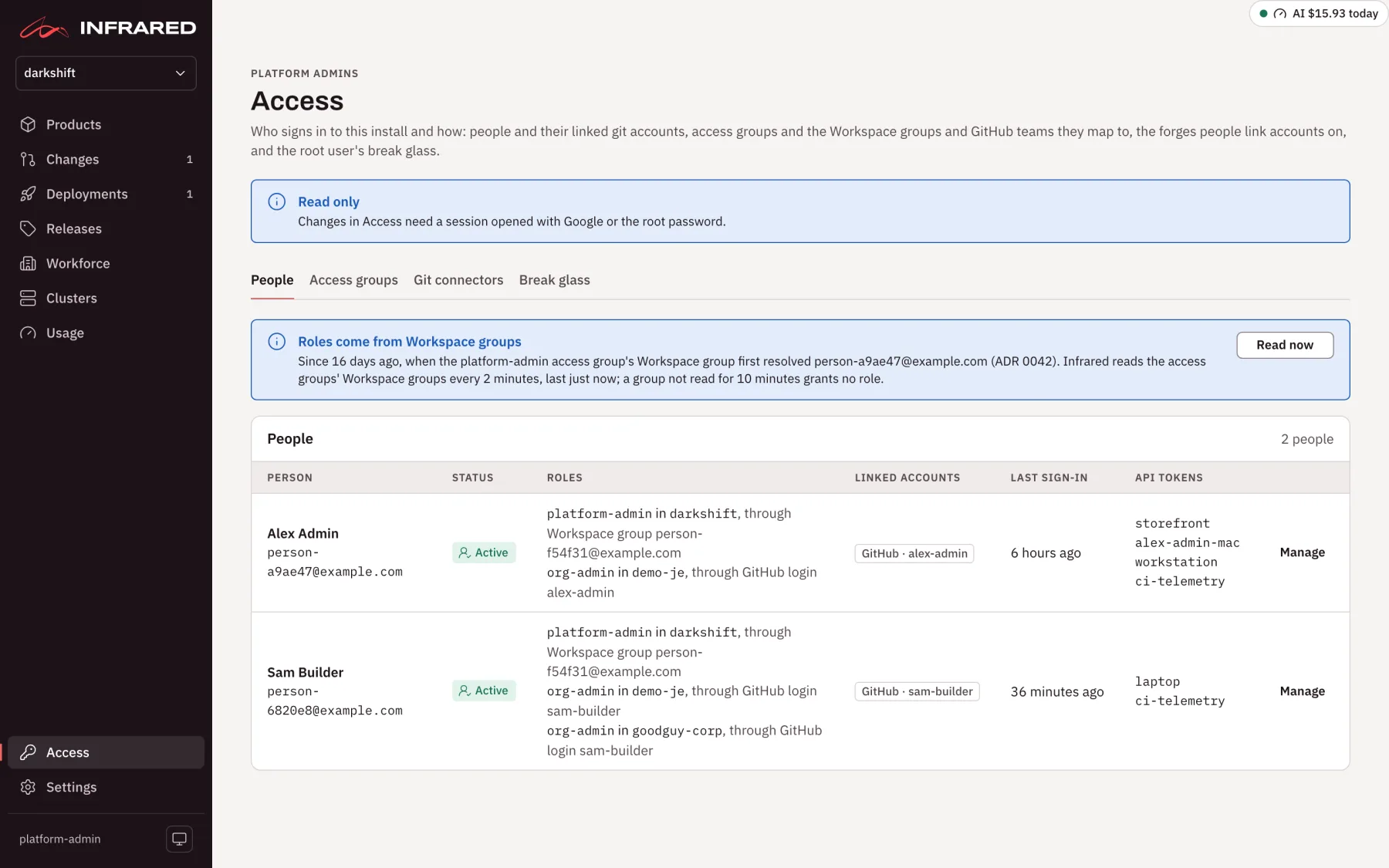
| Tab | What you find there |
|---|---|
| People | Everyone who has signed in with Google, and everyone in a mapped Workspace group who hasn't yet: their status, roles and where each comes from, linked accounts, last sign-in and API tokens. Manage opens one person. See People. |
| Access groups | Every org's access groups, the platform org first: each one's role, its Workspace group and the people in it, its people by email, and its GitHub team with the last sync. Map sets one access group's Workspace group, GitHub team and people by email. See Access groups. |
| Git connectors | The forges people link their git accounts on. See Git connectors. |
| Break glass | The root user: where its password lives, who should hold the vault, when the password was set, every use, and the root user's API tokens. See Break glass. |
People and Access groups start by saying how Infrared reads your Workspace groups and when it last did, with Read now to read them again.
Two other places hold the rest:
- Workforce → Access groups is where an org's admins edit that org's access groups: names, roles, Workspace groups, GitHub logins and people by email.
- You, which opens from your name at the foot of the rail, is each person's own page. It shows how you signed in, your roles and where each comes from, the git accounts you linked with a Link button for each one you haven't, and your API tokens.
Sign in with Google
Most people sign in with their Google Workspace account. You give Infrared a Google OAuth client, choose the domains that may sign in, and map access groups to Workspace groups. See Sign-in.
Sign in with GitHub
People with no Google Workspace account, such as a contractor, sign in with GitHub through the platform org's GitHub App. Only a login on some access group gets in. See Sign in with GitHub.
Access groups
An access group gives one role in one org to the people of a Workspace group, to people by email, and to people by GitHub login. It grants that role and nothing else. See Access groups.
Linked accounts
Each person links the git accounts they work with to their Infrared user, so their GitHub login can join the GitHub teams Infrared keeps. See Linked accounts and git connectors.
Git connectors
A git connector is a forge, at an address, that people link their accounts on: GitHub, GitLab or Gitea. See Git connectors.
Break glass
The root user is the install's first platform admin. It works when Google can't sign anyone in, and Infrared shows every use of it. See Break glass.
API tokens
ir, CI and MCP clients call the API with an API token, which acts with the roles of the person who minted it. See API tokens and ir.
Access through the API
"A platform admin's session" means one opened with Google or the root password.
| Method and path | What it does | Who |
|---|---|---|
GET /v1/access/people | Everyone, with the state of the Workspace directory | Platform admins |
DELETE /v1/access/people/{name} | Remove a person | A platform admin's session |
DELETE /v1/access/people/{name}/links/{connector} | Unlink a person's account | A platform admin's session |
GET /v1/access/access-groups | Every org's access groups, with who holds each | Platform admins |
GET /v1/access/directory | How Infrared reads Workspace groups, and what it last read | Platform admins |
POST /v1/access/directory/refresh | Read every mapped group now | Platform admins |
GET /v1/access/connectors | The git connectors, never a secret | Platform admins |
PUT /v1/access/connectors/{name} | Add or change a git connector, then check it | A platform admin's session |
DELETE /v1/access/connectors/{name} | Delete a git connector nobody has linked through | A platform admin's session |
POST /v1/access/connectors/{name}/check | Check a git connector | Platform admins |
GET /v1/access/break-glass | The root user's record, never the password or its hash | Platform admins |
PUT /v1/access/break-glass | The root user's address, vault links, vault item and holders group | A platform admin's session |
PUT /v1/access/break-glass/password | Rotate the root password | A platform admin's session |
GET, PUT /v1/orgs/{org}/access-groups | Read or replace an org's access groups | Anyone in the org reads; org admins replace |
GET /v1/orgs/{org}/access-groups/status | The org's access groups with who holds each | Anyone in the org |
GET /v1/auth/settings | The sign-in settings | Platform admins |
PUT /v1/auth/settings/google | The allowed domains and sign-up | A platform admin's session |
GET /v1/auth/methods | The ways this install offers to sign in | Anyone, signed in or not |
GET /v1/me/links | Your linked accounts, and the connectors you can link on | You, signed in with Google, or your token |
DELETE /v1/me/links/{connector} | Unlink one of your accounts | You, signed in with Google |
GET /v1/auth/tokens, DELETE /v1/auth/tokens/{name} | List and revoke API tokens | Platform admins see every token; anyone else their own |
POST /v1/auth/sign-in-links | A sign-in link, for one use within 60 seconds | An API token with an owner |
The install serves the API's full description at /api/docs.
Not yet
- GitLab and Gitea teams kept in step, as GitHub teams are. Linked GitLab and Gitea accounts are recorded and grant nothing yet.
- Sign-in through other OpenID Connect identity providers.
- Mapping Slack users to Infrared users.
- Mapping access groups to Kubernetes RBAC on workload clusters.
See the roadmap.